1. Home
  2. Talk2Log

Say what you spent. Talk2Log puts it on the right job.

Talk2Log turns voice notes and receipt photos into job-cost entries. It reads each one back, you confirm, and every project's income, costs and margin stay current while the work is still going.

  • Voice notes and receipt photos
  • Nothing saves until you confirm
  • Android and web, English and Spanish
Talk2LogProject / Activity
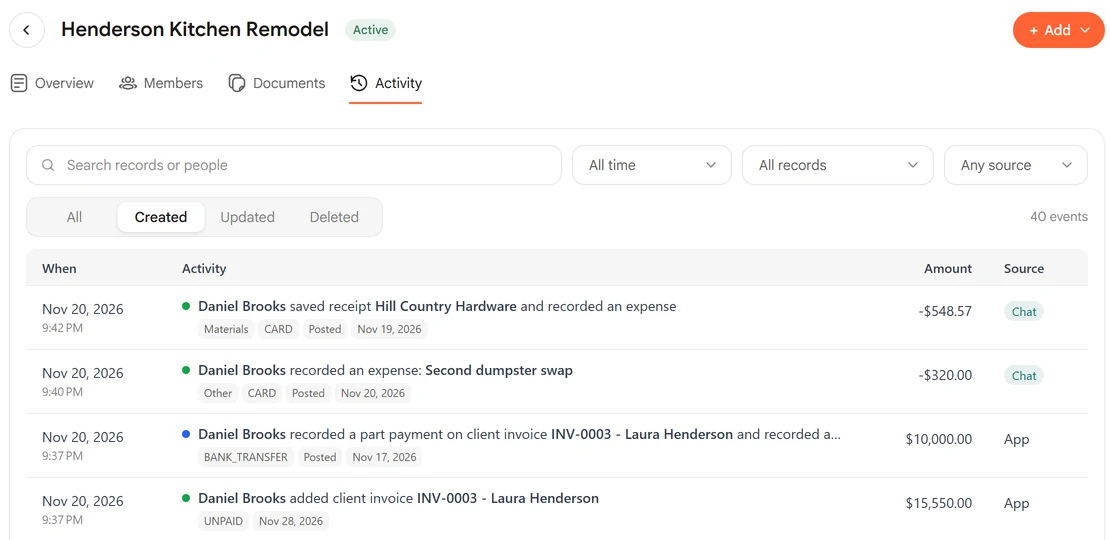
A Talk2Log project's activity log: a receipt from Hill Country Hardware and a dumpster swap expense, both recorded from a chat, then a part payment and a new client invoice added in the app. Screenshot slottalk2log/tl-14-activity-hero-crop.webp
Entries spoken in a chat say Chat
A kitchen remodel's activity log in Talk2Log on the web. Demo data.

One sentence in. One ledger entry out.

Talk2Log listens for what a bookkeeper needs: how much, to whom, for what and for which job. It reads those back as an entry, and nothing is saved until you say so.

What you say

“Add an expense for the Carter deck. $96 to Hill Country Hardware for a box of stainless deck screws, paid with the company card.”

A voice note, recorded on the job

What Talk2Log reads back

Waiting for youSaved
Type
Expense
Amount
$96.00 USD
Category
Materials Worked out
Paid to
Hill Country Hardware
Payment method
Company card
Description
Box of stainless deck screws
Project
Carter Lake House Deck & Patio
Date
Today Worked out
ConfirmEdit On the Carter Lake job costs

The highlighted words fill the entry. Category and date are worked out from the item and the day, for you to check. “The Carter deck” is matched to the project you already have. Illustration; the same entry on a real phone is in the first row below.

Log it from the job site. Read it from the office.

The same records on the phone in your pocket and the browser at your desk, so the numbers are right before anyone sits down to do the books.

Talk while you work. Talk2Log writes it down.

Voice notes, on Android and the web

Tap the mic and say what you spent and on which job. Talk2Log fills in the amount, who you paid, what it was for and the project, then asks before it saves anything.

  • Say it the way you'd tell your bookkeeper, in English or Spanish
  • Expenses, crew and subcontractor payments, payments from clients and refunds
  • The job, from what you call it: "the Carter deck" finds Carter Lake House Deck & Patio
  • Change a field, or confirm and get back to work
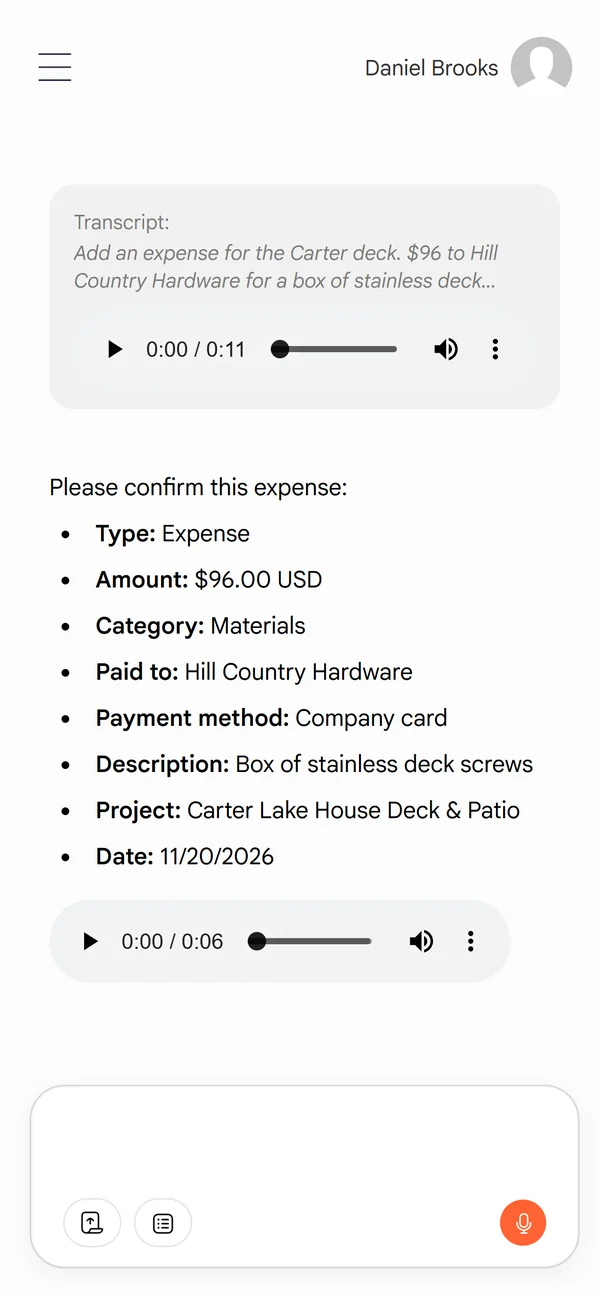
A voice note's transcript in Talk2Log on a phone, followed by the expense it understood: $96.00 for materials, paid to Hill Country Hardware by company card, for the Carter Lake House Deck and Patio, waiting for confirmation. Screenshot slottalk2log/tl-04-voice-confirm-mobile.webp
The voice note from above, read back on the phone. Demo data.

Snap the receipt. Skip the typing.

Receipt photos and PDFs

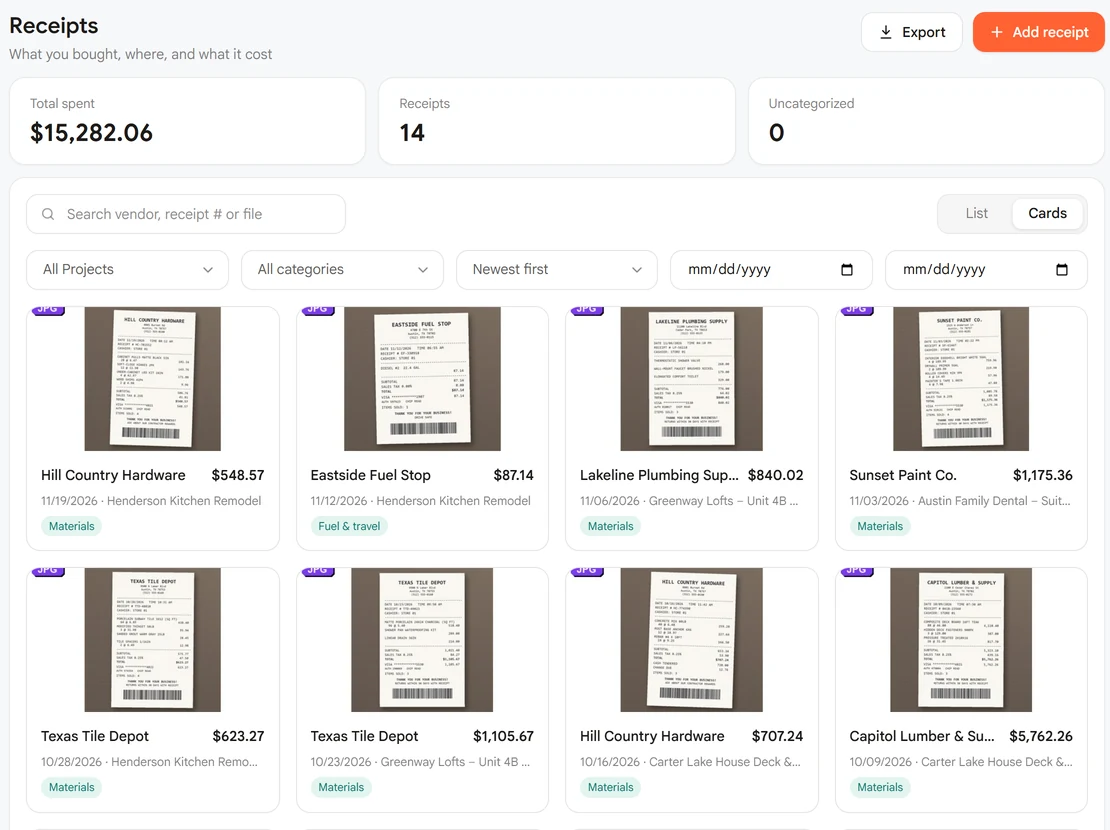
Take a photo of the receipt and say which job it's for. The vendor, store, date, every line item and the total are read off the paper for you to check.

  • Line items with quantity and amount, plus tax and total
  • The photo stays with the expense, one tap from the payment
  • Missing details are marked missing, never guessed
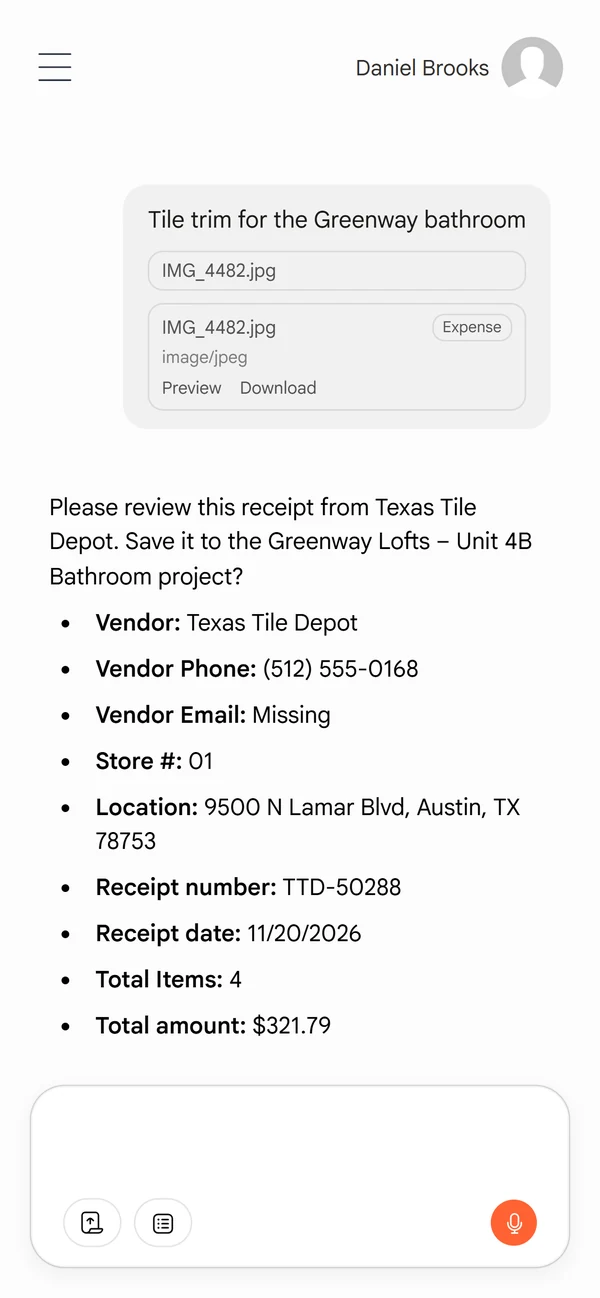
A receipt photo sent in Talk2Log for the Greenway bathroom, and the fields read from it: vendor Texas Tile Depot, phone, store, location, receipt number, date, four items and a total of $321.79. The vendor email is marked missing. Screenshot slottalk2log/tl-06-receipt-mobile.webp
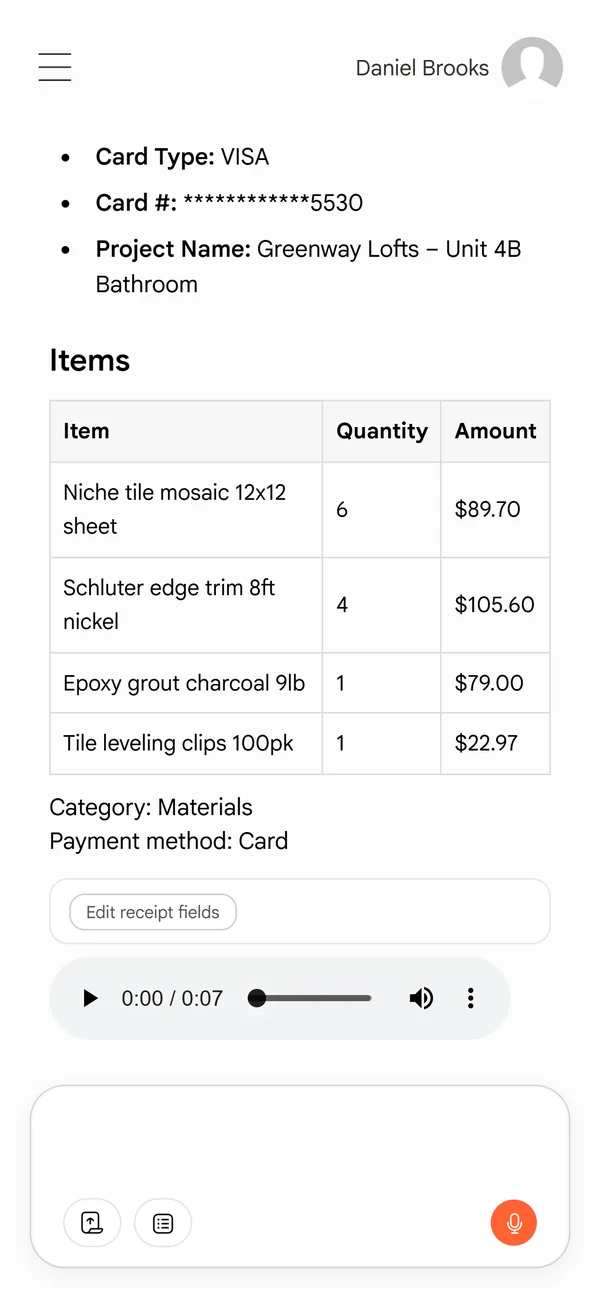
The same receipt's line items in Talk2Log: tile mosaic sheets, edge trim, epoxy grout and leveling clips, each with quantity and amount, with the category, payment method and an Edit receipt fields button. Screenshot slottalk2log/tl-07-receipt-items-mobile.webp
A tile receipt read on the phone, then its line items, before saving. Demo data.

Ask how a job is doing. Get the numbers back.

Questions in plain words

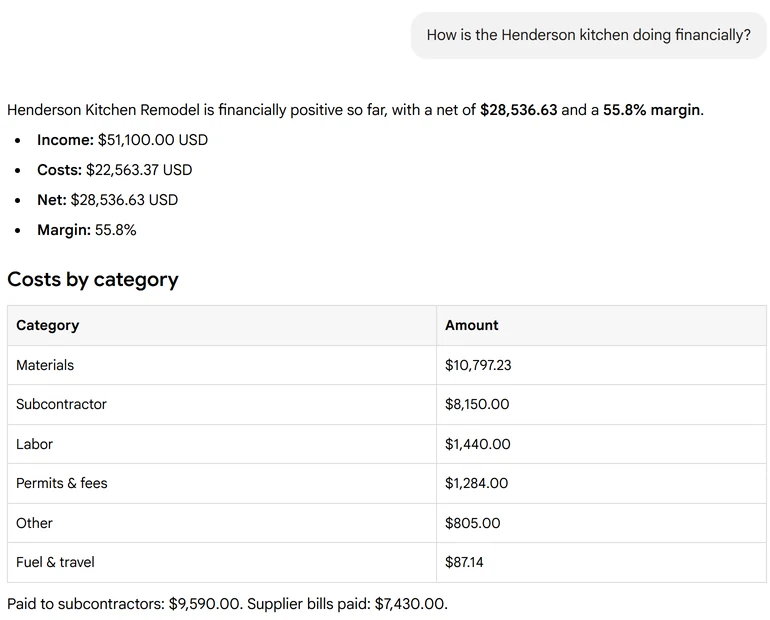
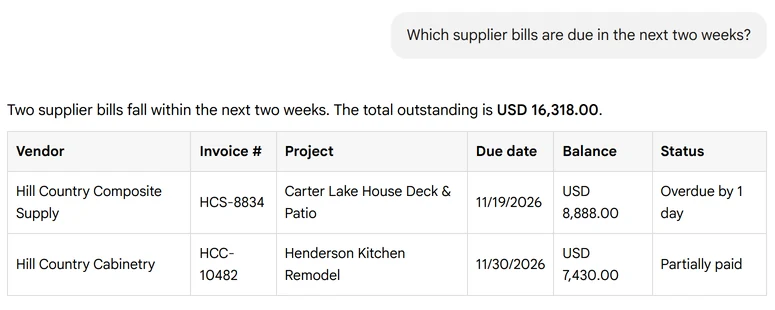
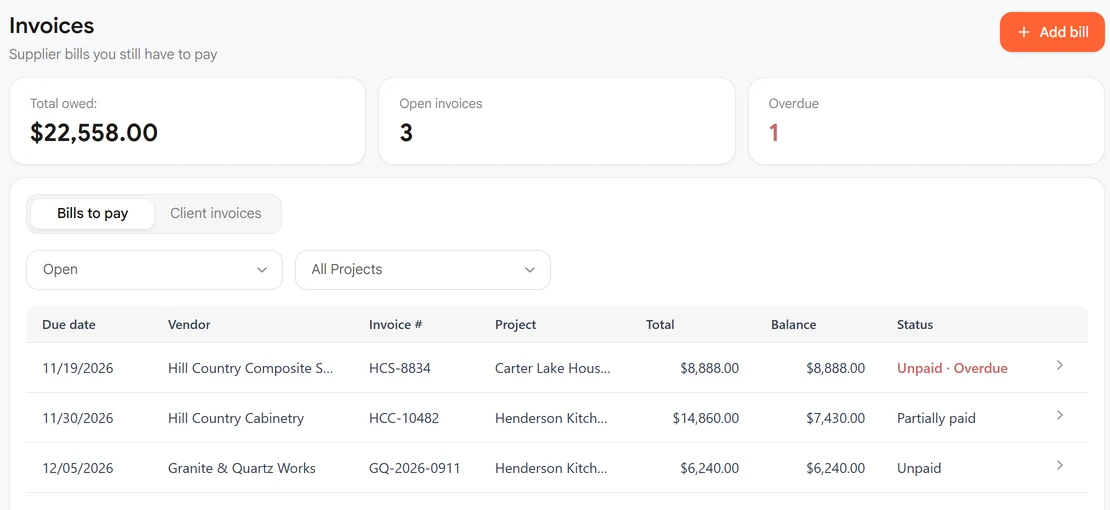
Ask the way you'd ask your office: "How is the Henderson kitchen doing?" or "Which supplier bills are due in the next two weeks?" The answer comes from your own entries, with the figures laid out.

  • Income, costs, net and margin for any job
  • Costs by category: materials, labor, subcontractors, permits
  • Bills that are due, overdue or partly paid
Talk2LogChat
Asked how the Henderson kitchen is doing financially, Talk2Log answers with the project's income, costs, net and margin, a table of costs by category, and what was paid to subcontractors and on supplier bills. Screenshot slottalk2log/tl-08-ask-crop.webp
Talk2LogChat
Asked which supplier bills are due in the next two weeks, Talk2Log answers with a table of two bills: vendor, invoice number, project, due date, balance and status, one overdue by a day and one partly paid. Screenshot slottalk2log/tl-09-bills-due-crop.webp
Two questions, answered from the company's own entries. Demo data.

Every job's money, on one screen.

The project overview

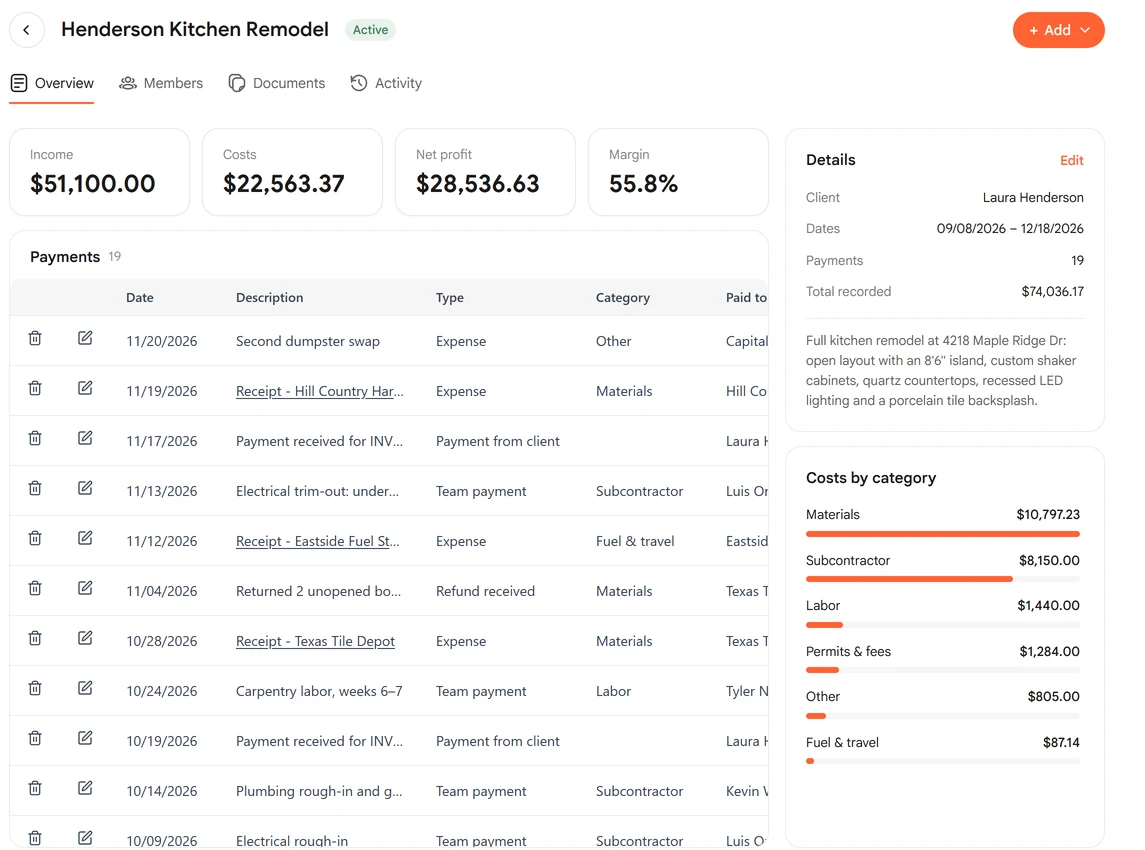
Income, costs, net profit and margin at the top, every payment underneath and costs broken down by category. You see which jobs are making money while they're still running, not after.

  • Client, dates and a description for each job
  • Every payment, with a link to its receipt
  • Members, documents and activity one tab away
Talk2LogProject / Overview
A Talk2Log project overview for a kitchen remodel: income, costs, net profit and margin tiles, the list of the project's payments, the project details and a costs-by-category breakdown with bars. Screenshot slottalk2log/tl-11-project-full-crop.webp
A kitchen remodel, mid-job. Demo data.

The rest of the books, kept by the same entries.

Every entry you confirm lands where a bookkeeper would look for it: the payments list, the receipts, the bills and the job it belongs to.

Every dollar in and out, across all your jobs.

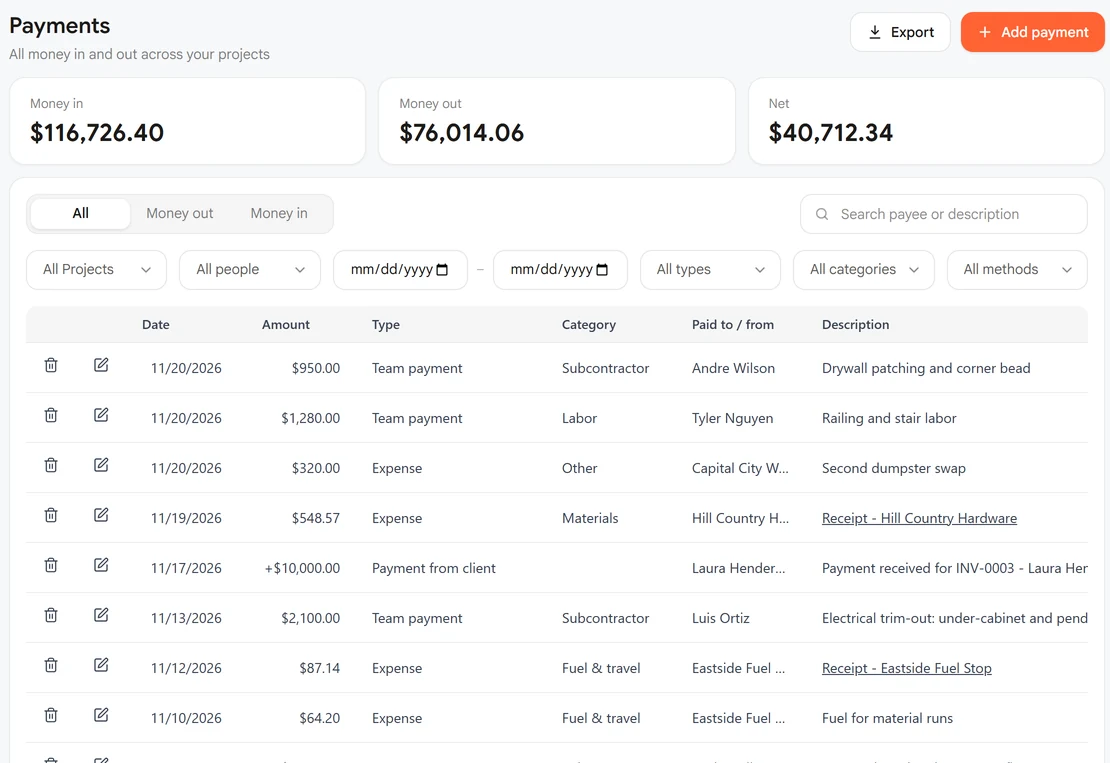
Crew and subcontractor payments, expenses and payments from clients in one list, with money in, money out and net at the top.

  • Filter by job, person, type, category and method
  • Search by payee or description
  • Export the list
Talk2LogPayments
The Talk2Log payments list across all projects: money in, money out and net, filters, and payments such as drywall patching, stair labor, a dumpster swap, a hardware receipt and a payment received from a client. Screenshot slottalk2log/tl-15-payments-crop.webp
Payments across every job. Demo data.

Built so the numbers hold up.

AI does the reading and the typing. The rules around it are ordinary software, and you can check every one of them.

You confirm every entry

Voice note or receipt, Talk2Log reads the entry back first. Nothing is saved until you say so, and any field can be changed before you do.

It marks what it can't find

A detail that isn't on the receipt or in what you said shows as missing. It is never filled with a guess.

Every change is on record

The activity log shows what was created, updated or deleted, by whom, and whether it came from a chat or the app.

Receipts stay attached

The photo stays with its expense. Open it from the receipt, the payment or the job's documents.

You decide what the crew sees

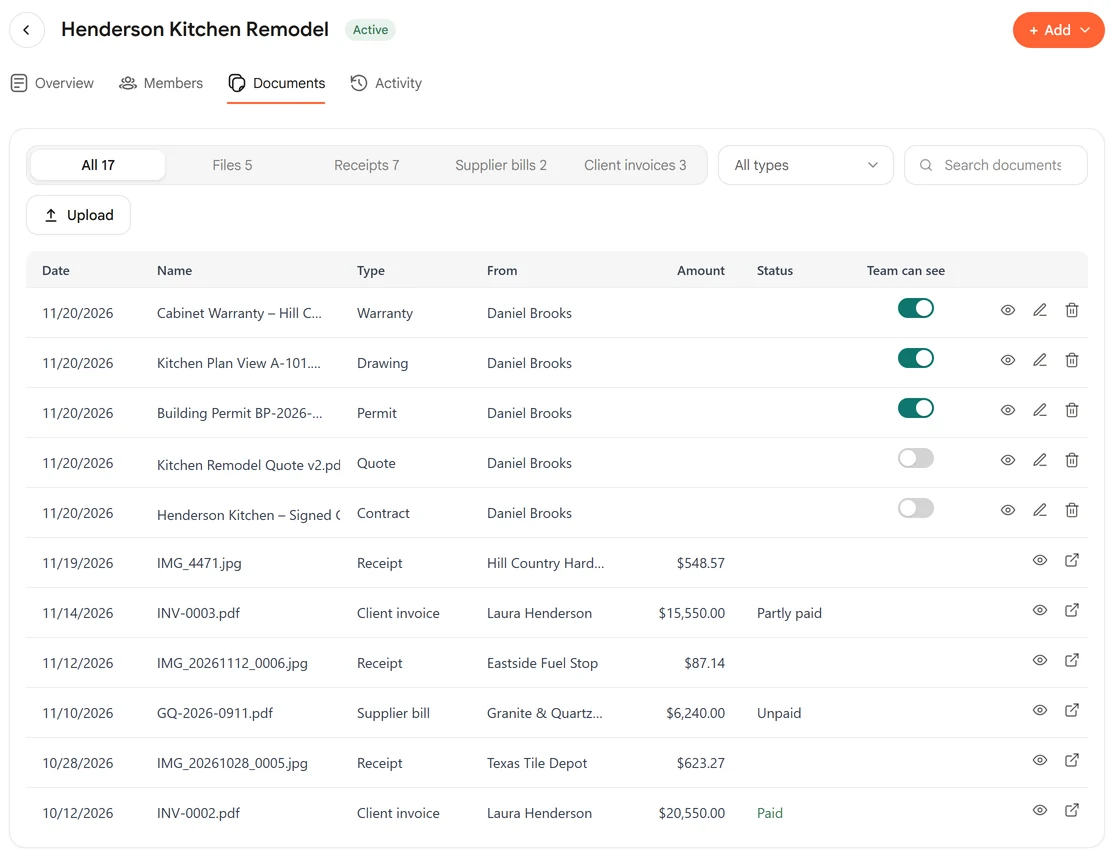
Each project document has a switch for whether the team can see it. Quotes and contracts can stay with you.

We build the app. OpenAI reads the words.

Talk2Log uses OpenAI's models to understand voice notes and read receipts. Everything around them, the projects, the ledger and the confirm step, is built and supported by vBiz Systems.

Questions crews ask.

Something else? Ask on the demo call, or send us a note.

Does Talk2Log save anything without asking me?

No. Every voice note and receipt is read back as an entry for you to check. Nothing is saved until you confirm it, and you can change any field first.

What happens when it can't read part of a receipt?

The field is shown as missing instead of guessed. You can fill it in, or save the entry without it.

Which devices does Talk2Log run on?

Android phones and any web browser, with the same records on both. On Android you can sign in with your fingerprint.

Can I use it in Spanish?

Yes. Talk2Log works in English and Spanish.

Can my crew use it too?

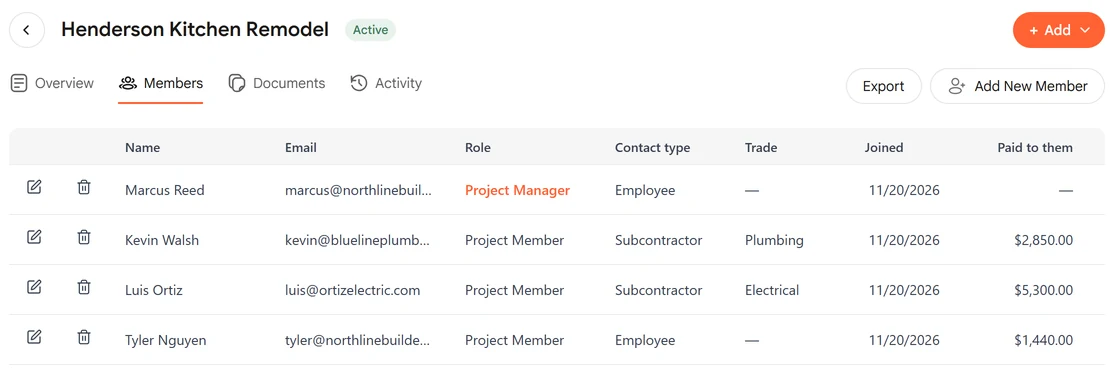
Yes. Add employees and subcontractors to a project with their role and trade. Receipts show who uploaded them, and each project document has a switch for whether the team can see it.

Can I get my records out?

Yes. Payments, receipts, projects and project members each have an Export button.

Who makes the AI that reads my voice notes?

Talk2Log uses OpenAI's models to understand voice notes and read receipts. vBiz Systems builds everything around them: the projects, the ledger and the confirmation step that keeps you in charge.

Is Talk2Log only for construction?

It is built around jobs and projects, so it suits contractors, remodelers and the trades first. Any small business that tracks what each job costs can use it the same way.

Bring a receipt. We'll log it on the call.

In 30 minutes we'll set up one of your jobs, log a cost by voice and a receipt by photo, and show you that job's numbers update. You can also see more at talk2log.com (opens in a new tab).

On the call

  1. 1One of your current jobs, set up as a project
  2. 2A cost logged by voice, and a receipt by photo
  3. 3The job's income, costs and margin, live
  4. 4Getting your crew going on Android and the web