Software for the work your team does every day

A CRM for service businesses, a complete platform for colleges, event management and job-cost tracking. Digital employees built in take on the routine work, and your team stays in charge.

  • CRM, student records, events and job costs
  • Digital employees, with your approval
  • Building software since 2011

Which one is built for your work?

Four products for four very different workdays, from one team that has built business software since 2011. AI where it removes real work, plain dependable software everywhere else.

Colleges and career schools

CTeck Connected Campus

CRM, admissions, student information, messaging and documents on one record, from first inquiry to graduation.

Built in: AI that sorts every inbound text and flags the urgent ones, enrollment and student-support assistants, and insights on how fast your team replies.

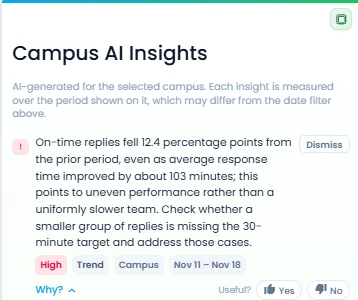
A Campus AI Insight in CTeck: on-time replies fell 12.4 percentage points from the prior period, with a suggestion to check whether a smaller group of replies is missing the 30-minute target.
Campus AI Insights: what changed, and what to check.

Fundraising dinners, galas and community events

Event Manager

Invitations, registration, tickets, table seating on a drag-and-drop floor plan, QR check-in at the door and funds raised, year over year.

Built in: parties seated together the moment they RSVP.

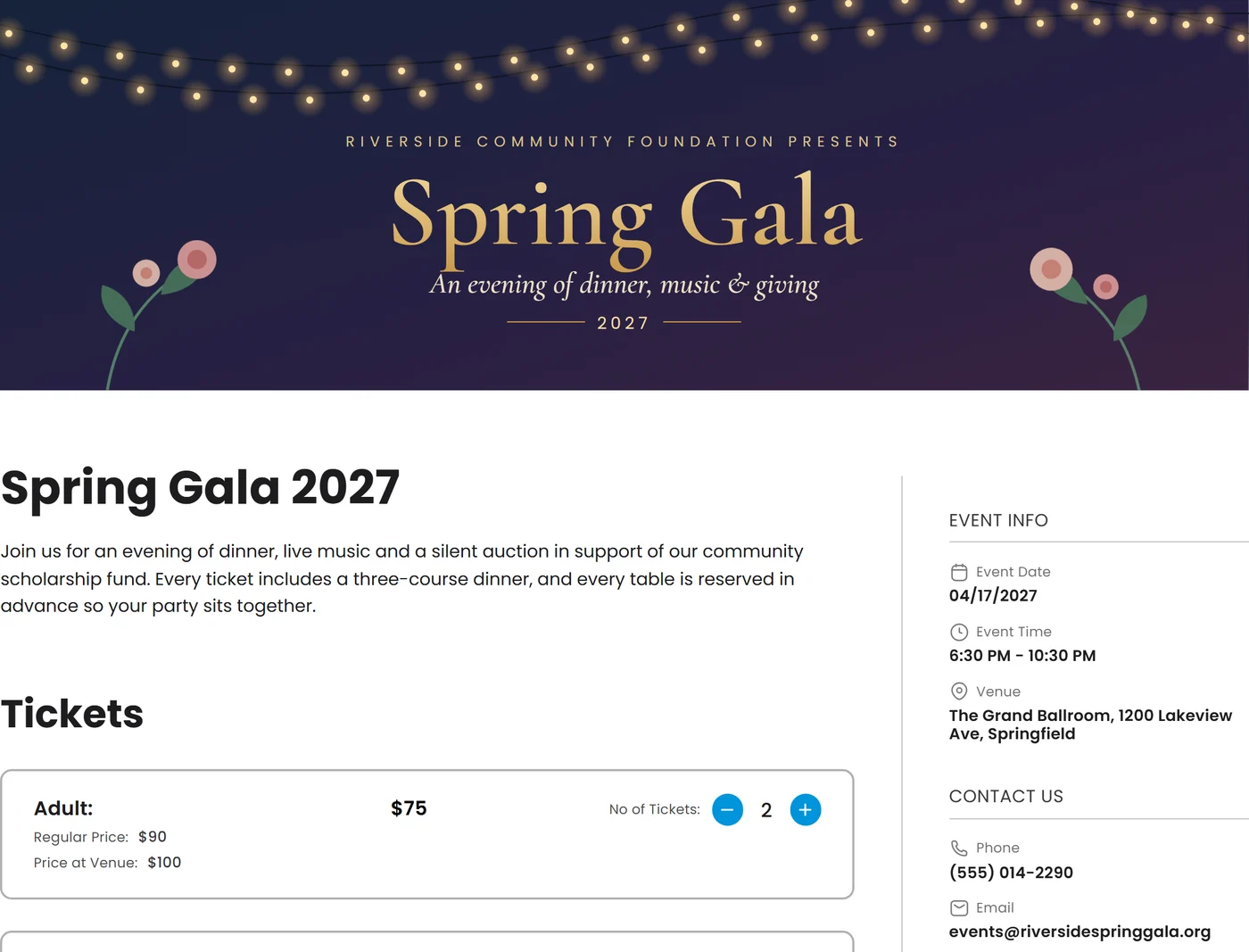
The top of an Event Manager public ticket page: the Spring Gala 2027 banner, presented by a community foundation, above the event title.
The public ticket page your guests buy from.

Bookkeeping for small businesses

Talk2Log

Job costs, payments, receipts and invoices for every project, logged from the job site in seconds, on your phone or the web.

Built in: say what you spent or snap the receipt. AI fills in the entry and you confirm before it saves. Ask how a job is doing and get the numbers back.

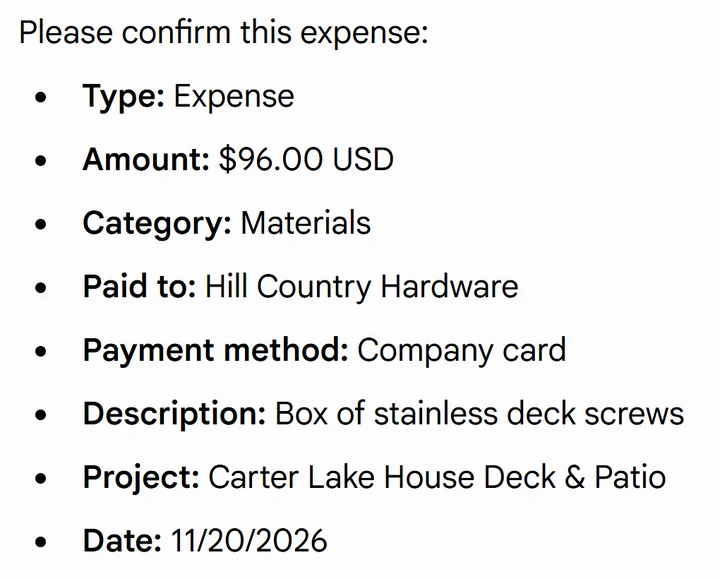
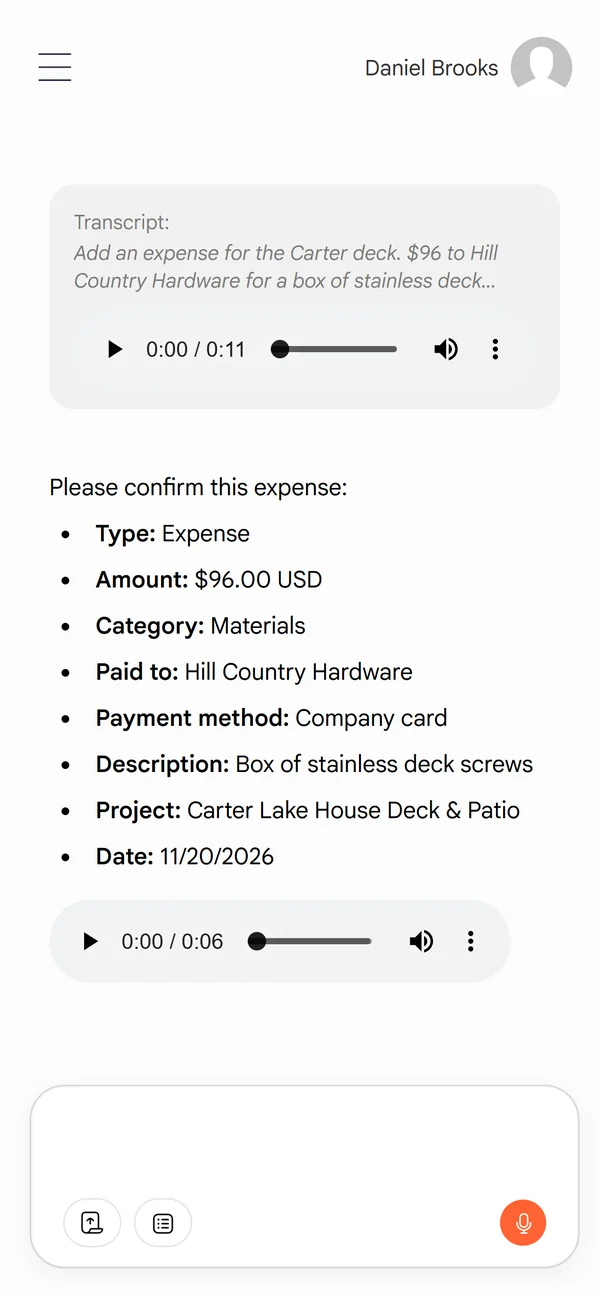
Talk2Log reads a voice note back as an expense to confirm: $96.00 for materials, paid to Hill Country Hardware by company card, for the Carter Lake House Deck and Patio project.
A voice note, read back for you to confirm.

A chatbot answers. An employee follows through.

Most AI on business websites stops at the answer. Ours works the whole task, inside your records, the way a trained staff member would.

  • ×
    Starts from zero every timeIt doesn't know the customer called last week or what they bought.
  • ×
    Can talk, can't doIt can say Thursday is open. It can't book Thursday.
  • ×
    Dead endsWhen it doesn't know, the customer leaves, and nobody on your team hears about it.
  • ×
    One channelThe website widget has no idea about the text message or the phone call.
  • ✓
    Knows the customerIt reads the record first: past visits, messages and open paperwork.
  • ✓
    Does the workBooks, moves and cancels appointments, sends forms and logs every step.
  • ✓
    Hands over properlyWhen a person is needed, it passes the conversation on with a note and steps back.
  • ✓
    One memory across channelsTexts, email, website chat, WhatsApp and calls land on the same record.

A chatbot: one channel, no memory, nothing booked.

Answers the late-night text, books the consultation, sends the reminder, asks for the review, chases the missing form and hands the billing question to a person.

Staff a role, not a chat window.

Each digital employee starts from a role template: a job description, your knowledge, the actions it may take and the hours it works.

  1. Front Desk

    Day and night, on every channel

    Answers texts, website chat, WhatsApp, email and phone calls from your own price list and policies.

    • Answers from your knowledge, not guesses
    • Picks up the phone and takes messages
    • Books and moves appointments in the same conversation

    Hands to you: upset customers and anything it can't answer, with a note.

    VbConnectContact / Calls
    A phone call answered by the Front Desk digital employee, with the full transcript saved on the customer's record. Screenshot slotvbiz-connect/vc-14-lead-call.png
    Answered by the AI, start to finish
    A real call to one of our demo businesses. The transcript lands on the customer's record.
  2. Appointment Coordinator

    Whenever a customer asks

    Books, moves and cancels appointments against live availability, with the right staff member, and confirms by text or email.

    • Live availability, no double-booking
    • Books for family members too
    • Several bookings in one conversation

    Asks you first: cancellations, or any action you tick "always ask".

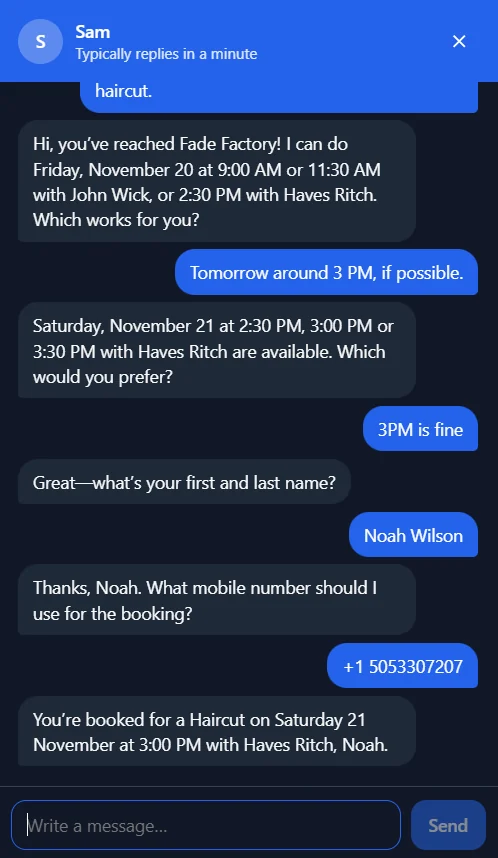
    Website chat on a phone: the digital employee offers open times, the customer picks one, and the appointment is booked. Screenshot slotvbiz-connect/vc-17-chat-mobile.png
    BookedOn the calendar, confirmation sent
    Website chat on a phone, at one of our demo businesses.
  3. Reminders and follow-up

    8am to 9pm, in the customer's time zone

    Confirms each booking, reminds the customer ahead of time, and follows up when someone doesn't show.

    • Reply C to confirm, R to reschedule
    • A follow-up after a no-show
    • Nudges customers to book again

    Hands to you: any reply that isn't a simple yes or a reschedule.

    What the customer sees. Illustration with sample names.
  4. Reviews

    After each visit

    Asks for a rating after each visit. Happy customers get your review link. Unhappy ones go straight to a manager instead.

    • A 1 to 5 rating by text
    • Your review link for a 4 or 5 only
    • Thanks everyone who replies

    Hands to you: every low rating, before anything else is sent.

    What the customer sees. Illustration with sample names.
  5. Admissions Rep

    Day and night, all through enrollment

    Replies to new inquiries in minutes, answers program, start-date and cost questions from your catalog, and books the campus visit.

    • Answers from your catalog and policies
    • Books visits and info sessions
    • Chases missing application documents

    Hands to you: financial aid and transfer-credit questions.

    A school's website chat. Illustration with sample names.
  6. A role you design

    The hours you set

    Every digital employee runs on the same engine. A new role is a new set of instructions, knowledge, allowed actions and working hours, built for your business.

    • Start from a template, make it yours
    • Tested on scripted conversations first
    • You choose what it may do alone

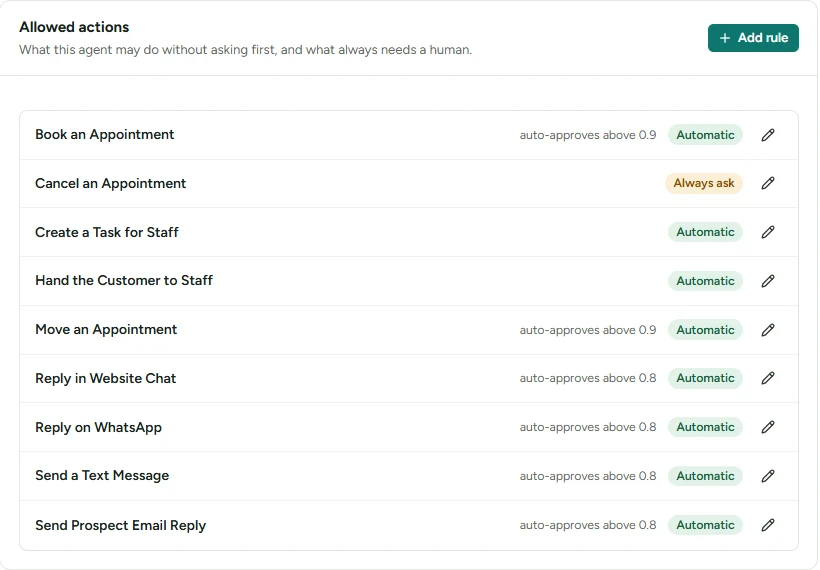
    You decide: which actions run on their own and which always wait for you.

    VbConnectDigital employee / Allowed actions
    One digital employee's allowed actions: booking and replying run automatically above a confidence level, cancelling an appointment always asks a person. Screenshot slotvbiz-connect/vc-06-agent-actions.png
    You decide what needs your OK
    The rules for one digital employee, at one of our demo businesses.

You stay the manager.

Each digital employee has a job description, a list of what it may do, and a person it reports to.

See when it asks for approval
  1. 01
    It does the workReads the record, decides the next step and prepares the message or booking.
  2. 02
    You approve, or let it actStart with approval on everything. Loosen it one action at a time.
  3. 03
    Every step is on recordWhat it did, why it did it, and who said yes.
VbConnectDigital employees / Approvals
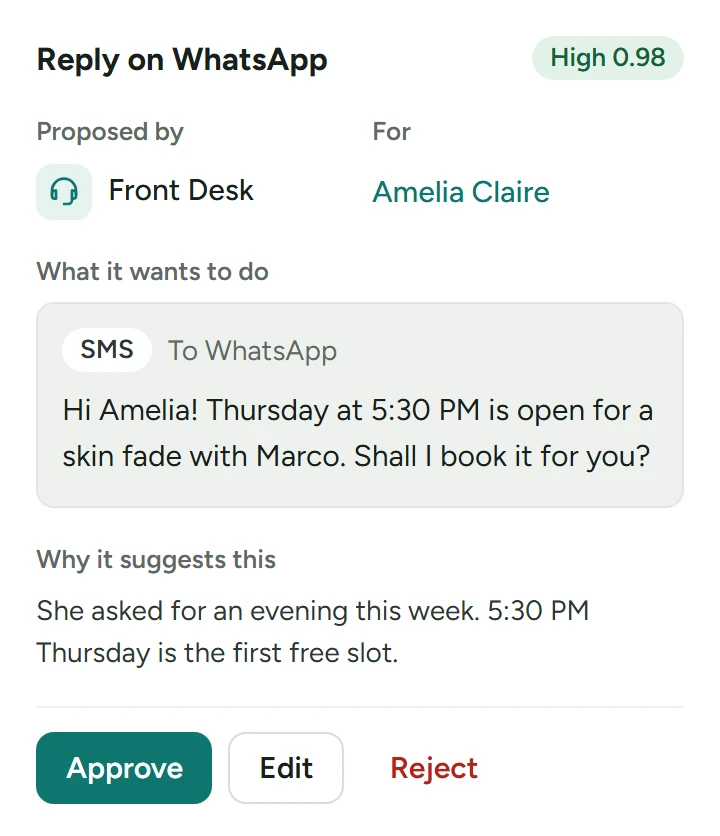
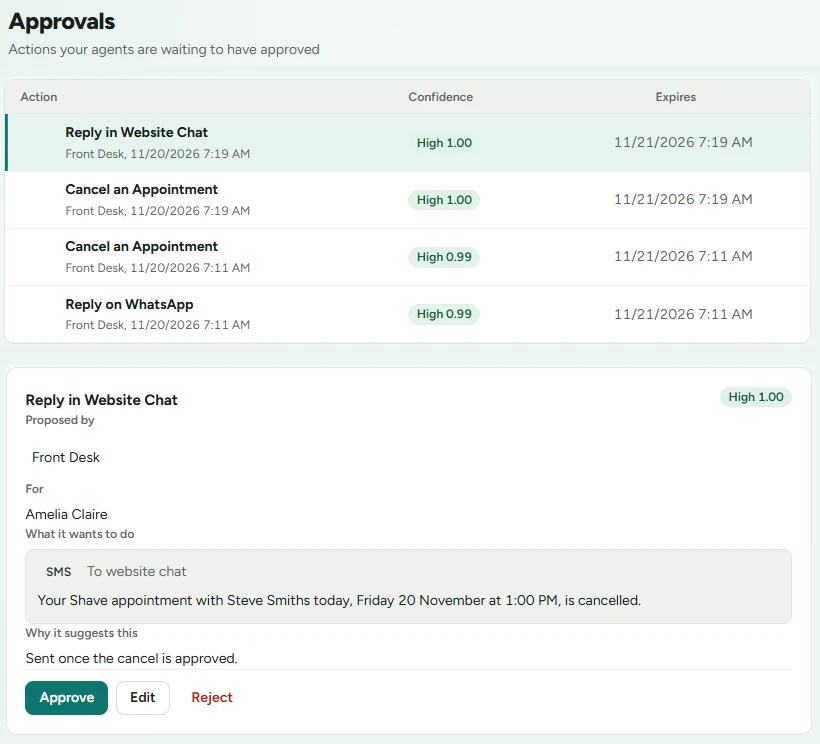
The approvals queue: actions a digital employee prepared, each with its confidence, and one open showing the message it wants to send, why, and Approve, Edit and Reject buttons. Screenshot slotvbiz-connect/vc-02-approvals.png
It says why, before you say yes
The approvals queue in VbConnect, at one of our demo businesses.

Guard rails a good manager would insist on.

They are checked by the software before anything goes out, not left to the AI's judgment.

  • Consent firstOpt-in, do-not-contact lists and STOP replies are checked before every message.
  • Quiet hoursNo texts before 8am or after 9pm in the customer's own time zone.
  • Facts from your recordsPrices, times and links come from your data. If it can't find them, it doesn't guess.
  • It knows when to step backAn upset customer, a question it can't answer, or a request for a person: it hands over with a note.
  • A budget it can't exceedSet a monthly AI spend. It stops at the limit instead of surprising you.
  • It says what it isAsked sincerely, it tells the customer it's a virtual assistant.

A closer look at each product.

What your team works in every day, product by product. Each one also has its own page with the full detail.

VbConnect keeps customers, calendar and conversations together.

For service businesses and community organizations

Everything a front office runs on, in one system your whole team shares, with digital employees working alongside it.

  • Contacts and families with every visit, message and payment on one record
  • One inbox for texts, email, website chat, WhatsApp and calls
  • Appointments and tasks on a shared calendar, by staff member
  • Memberships and hall bookings for clubs, centers and community groups
  • Workflows that send the right message at the right step
See digital employees in VbConnect See VbConnect in a demo
VbConnectCalendar / Week
The VbConnect week calendar, booked through the day with haircuts, fades, shaves, colouring and consultations, alongside follow-up tasks for new inquiries. Screenshot slotvbiz-connect/vc-16-calendar-week.png
Appointments and follow-up tasks on one calendar, at one of our demo businesses.

CTeck keeps one record from first inquiry to graduation.

CTeck Connected Campus, for colleges and career schools

Admissions, enrollment, student records and messaging share a single student record, so nobody re-types anything and every office sees the same history.

  • Engage: leads, calls, texts and emails on one timeline, by admissions rep
  • Enroll: online applications, document checklists and e-signatures
  • Campus: courses, schedules, attendance, grades and the student ledger
  • Connect: two-way texting with response-time tracking for every rep
  • Portals for students, plus AI that sorts every inbound text and flags the urgent ones
Explore CTeck
CTeckLead / Application and documents
A CTeck lead record at the Applicant stage: the admissions pipeline, the open application with its program and campus, and the document checklist showing an enrollment agreement waiting for e-signature. Screenshot slotcteck/ct-15-enroll-application.png
An application in progress, with its documents. Demo data.

Student records that fit the size of your school.

For colleges on CTeck, and for small schools on VbConnect

Colleges run the full system in CTeck. Small schools get a simpler layout of the same screens on VbConnect, with only the fields they need.

  • Programs, courses and class schedules with teachers and room limits
  • Course registration for one student or many at once
  • Attendance by class day with the last five days at a glance
  • Grades and progress notes, and a ledger with payment schedules
CTeckClass schedule / Attendance
A class's attendance for one day: each student marked Present, Absent, Tardy or Excused, minutes late, and colour-coded marks for the last five class days. Screenshot slotcteck/ct-18-campus-gradebook.png
Taking attendance for a class day. Student names are samples.

We connect the systems you already run.

For colleges and schools keeping their SIS, LMS or CRM

Our engineers build the connection between our software and yours. When a lead enrolls, the student is created in your SIS without anyone re-typing it, and the CRM hears back.

  • Already connected for clients: Banner, Anthology, CampusIvy, Canvas, Velocify, Dynamics 365 and more
  • Two-way: new students go into the SIS, their status comes back to the CRM
  • Grades, attendance and financial aid moved where they're needed next
  • Your data brought across when you switch, checked with you first
  • Not on the list? We build the connection
See our integrations
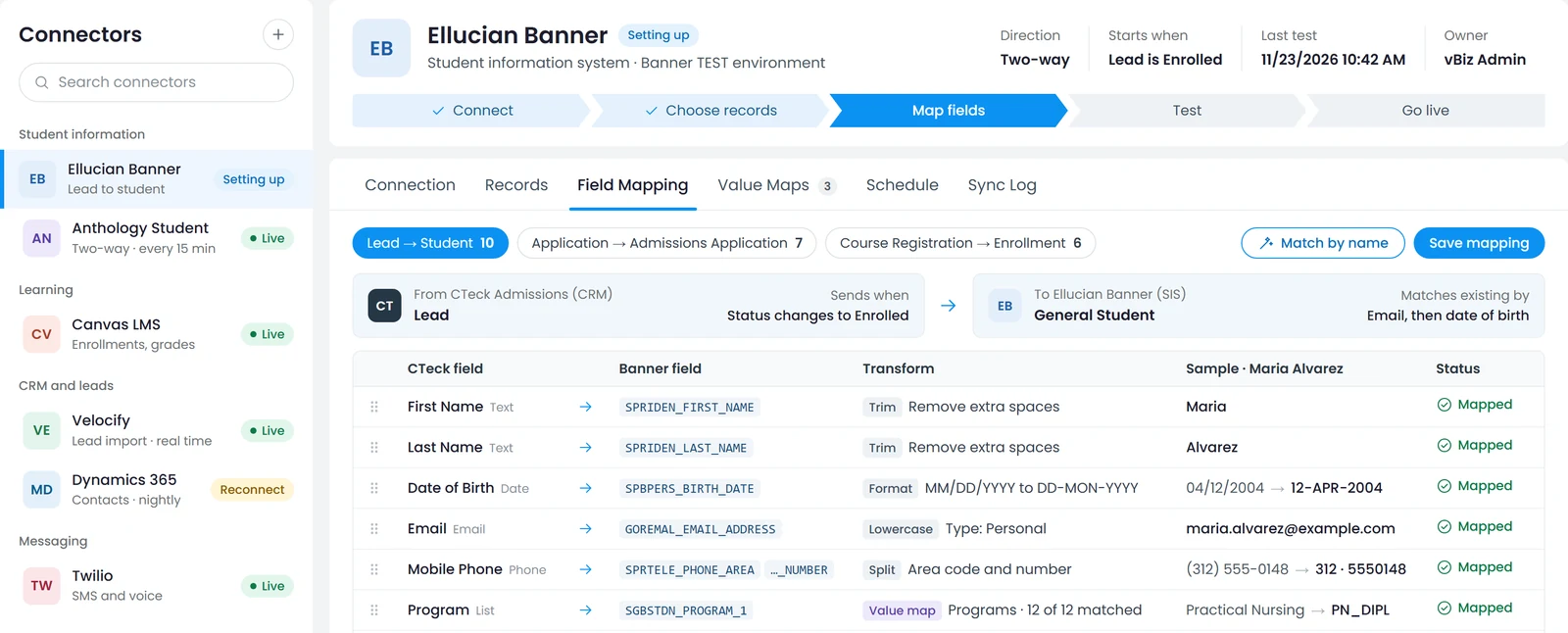
CTeckSetup / Integrations / Field mapping
An integration setup screen: a list of connected systems (Ellucian Banner, Anthology Student, Canvas LMS, Velocify, Dynamics 365 and Twilio) with their status, and Ellucian Banner being set up, with CTeck lead fields such as name, date of birth, phone and program mapped to Banner student fields, each with its transform and a sample value. Screenshot slotcteck/ct-25-integrations.png
Mapping an admissions lead to a student record in the SIS. Illustrative screen, sample data.
  • Ellucian BannerStudent information
  • AnthologyCampusVue and CampusNexus
  • CampusIvyStudent information
  • FAMEFinancial aid
  • EdufficientStudent information
  • Canvas LMSLearning
CTeck and
VbConnect
Built for each client
  • VelocifyLead management
  • Microsoft Dynamics 365CRM
  • IntelliboardReporting
  • TrueDialogMessaging
  • TwilioCalls and texts
  • iContactEmail
CRM to SIS and backGrades and attendanceFinancial aidMessagingReporting

Each one built for a client project. Something not listed? We build the connection.

Event Manager runs the night, from invitation to check-in.

For fundraising dinners, galas and community events

Run the whole event in one place: who's invited, who's coming, where they sit and what was raised.

  • Invitations and RSVPs by email, with guests and families kept together
  • Registration and tickets, sent to each ticket holder with a QR code
  • Seating on a drag-and-drop floor plan, with reserved tables
  • Check-in at the door by name, ticket number or QR scan, a whole party at once
  • Funds raised by payment type, compared year over year
Explore Event Manager
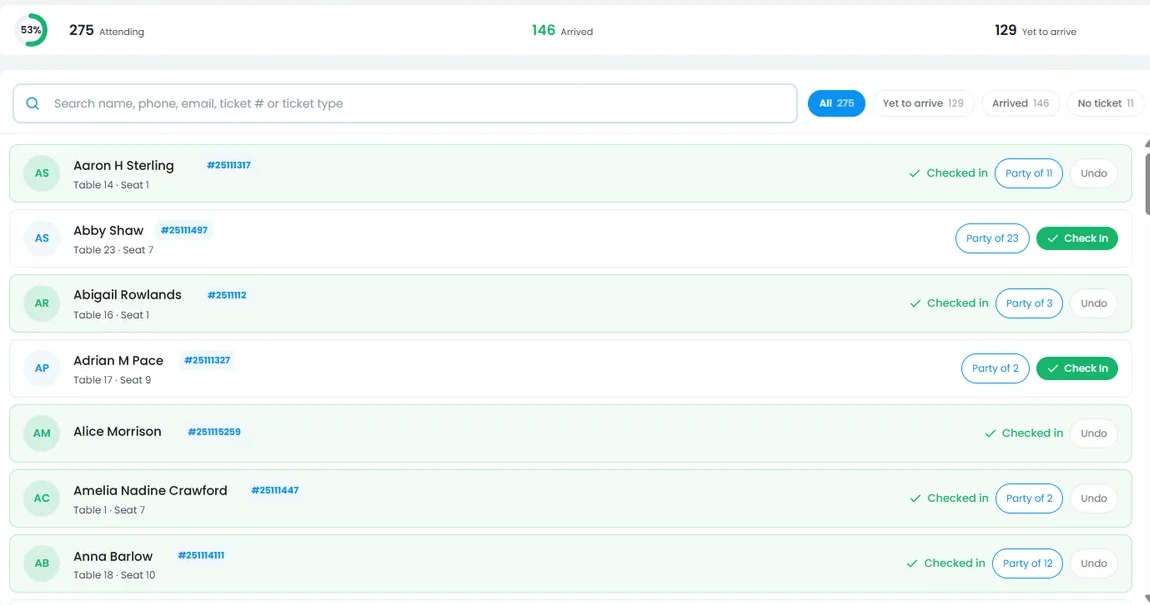
Event ManagerCheck-In
The Event Manager check-in screen: arrived and yet-to-arrive counts, a search by name, phone or ticket number, and each guest with their table and seat, party size and a Check in button. Screenshot slotevents/ev-04-checkin.png
Check-in on the night. Guest names are samples.

Talk2Log shows what every job is making.

Bookkeeping for small businesses

No spreadsheets at the end of the week. Say what you spent or snap the receipt, and the cost lands on the right project, with the job's numbers always up to date.

  • Speak it or type it: "Add $96 to Hill Country Hardware for the Carter deck"
  • Snap the receipt and the vendor, items and totals are read for you
  • You confirm before anything is saved
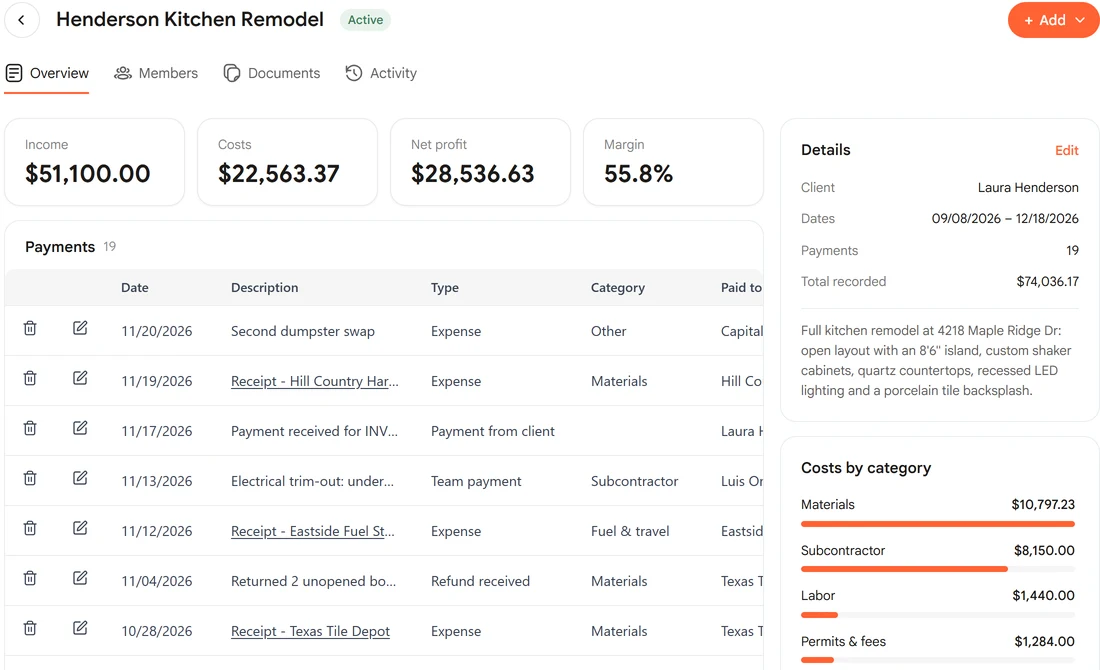
  • Each project at a glance: income, costs, net profit, margin and costs by category
  • Ask in plain words: "How is the Henderson kitchen doing?" or "Which bills are due?"
  • Payments, receipts, supplier bills and client invoices, with crew, contacts and documents per project
Explore Talk2Log
Talk2LogProject / Overview
A Talk2Log project on the web: income, costs, net profit and margin, the project's payments, and costs broken down by category. Screenshot slottalk2log/web/11-project-overview.png
Talk2Log on a phone: the transcript of a voice note, then the expense it understood (amount, category, who was paid, project and date) waiting for confirmation. Screenshot slottalk2log/mobile/04-chat-voice-confirmation.png
A project on the web, and a voice entry on the phone. Demo data.
Since 2011

We've built software for colleges, schools, service teams and event organizers since 2011. Today that's four products, all built and supported by the same team.

A named partnerEvery client has an account partner who knows their setup. You won't get lost in a ticket queue.

Built for careful workFERPA-aware access in CTeck. Consent and quiet-hour checks on every message.

We build the software. The AI works inside it.

Our digital employees run on OpenAI's models. What we build is everything around them: your records, the rules they follow and the approvals that keep you in charge.

How getting started works

  1. Discover

    We learn how your team works and where the most time goes.

  2. Set up

    We bring over your records, connect your channels and set the product up the way you work.

  3. Supervised start

    Where a digital employee helps, it prepares and your team approves, for as long as you like.

  4. Expand

    More modules, more roles and more autonomy, at your pace.

See it working on a 30-minute call.

Bring the work that takes most of your team's day. We'll show you the product that fits, and where a digital employee could take on the routine part.

On the call

  1. 1The work that takes most of your team's time
  2. 2The product that fits, live
  3. 3What a digital employee would do, and what it asks first
  4. 4What a rollout looks like for a team your size