1. Home
  2. AI Solutions
  3. Business Process Automation

Automate repetitive work. Focus on what matters.

The same follow-up sent by hand, requests forwarded from inbox to inbox, and steps forgotten when someone is out. We turn the predictable steps into workflows and send the exceptions to a person.

What an automated workflow looks like

Shown in vbPlatform, our business CRM with AI agents. We also build workflows inside the software you already run.

Every step visible, every branch clear.

For whoever owns the process

A workflow is drawn as steps and branches, so you can see what happens to a new inquiry and test it before it goes live.

  • Test runs show the path taken
  • Rules where rules work, AI only where it helps
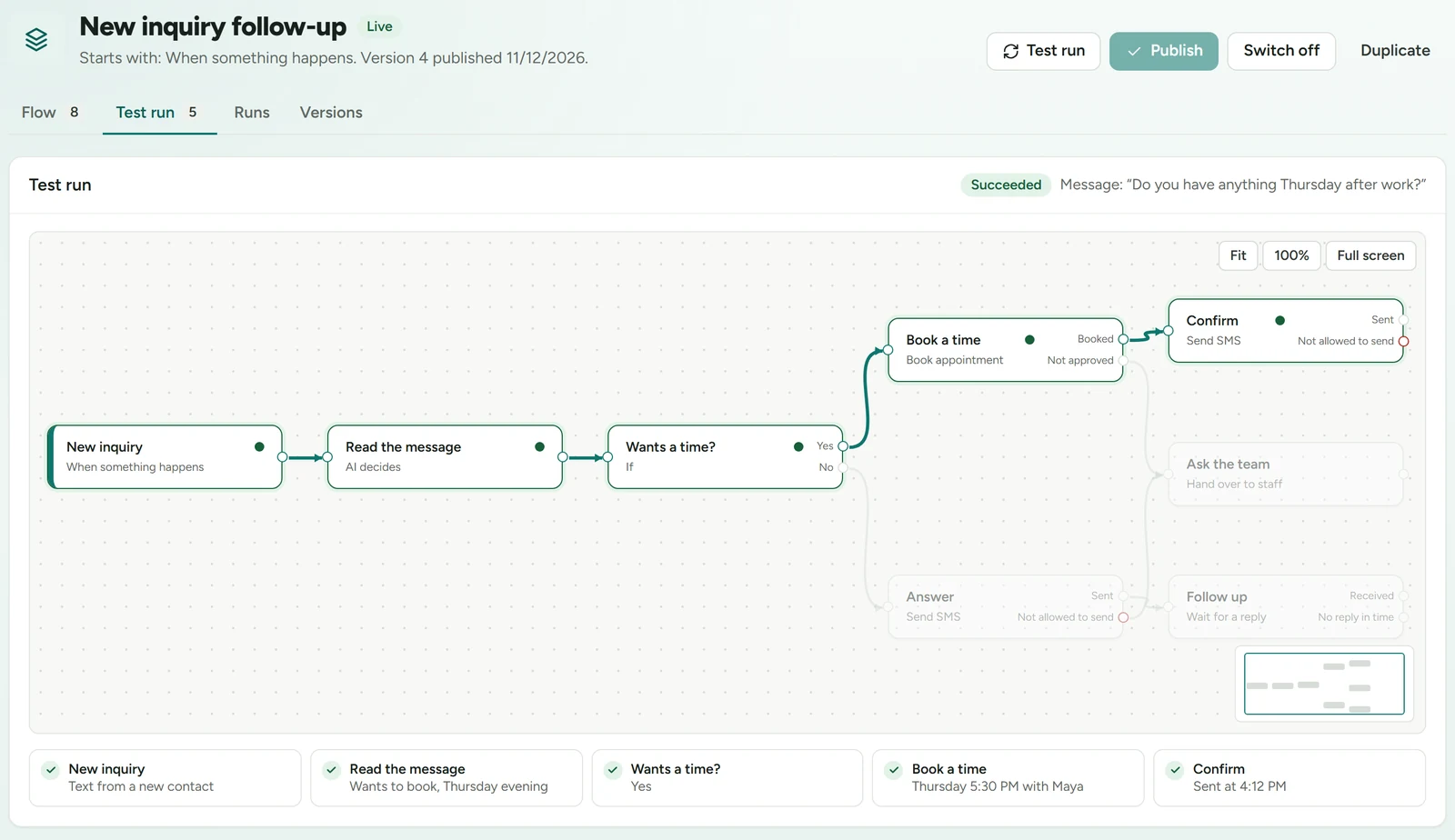
vbPlatformWorkflows / New inquiry follow-up
A workflow called New inquiry follow-up after a test run: a new inquiry is read, the customer wants a time, an appointment is booked and a confirmation text is sent. Branches that were not taken, such as asking the team or following up later, are greyed out, and the run's five steps are listed underneath.
A workflow after a test run. Demo data.

Exceptions go to a person.

For the team that checks the work

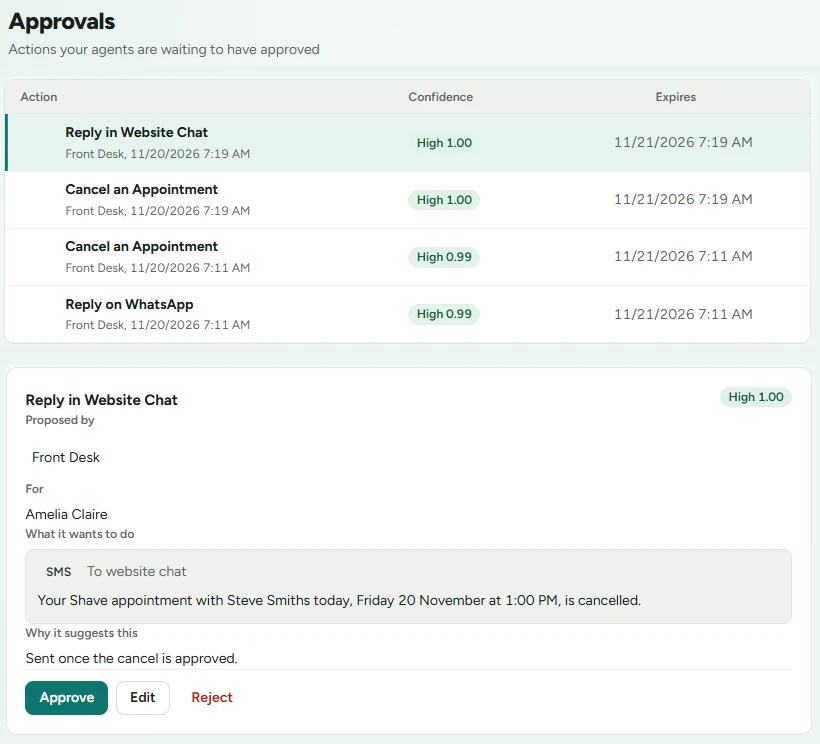
When a step is unusual or risky, the workflow stops and asks. You see what it wants to do and why, then approve, edit or reject.

  • One approvals queue
  • The reason shown with each request
vbPlatformApprovals
The approvals queue: actions an AI agent prepared, each with its confidence, and one open showing the message it wants to send, why, and Approve, Edit and Reject buttons.
Actions waiting for approval. Demo data.

You decide how much runs alone.

For managers

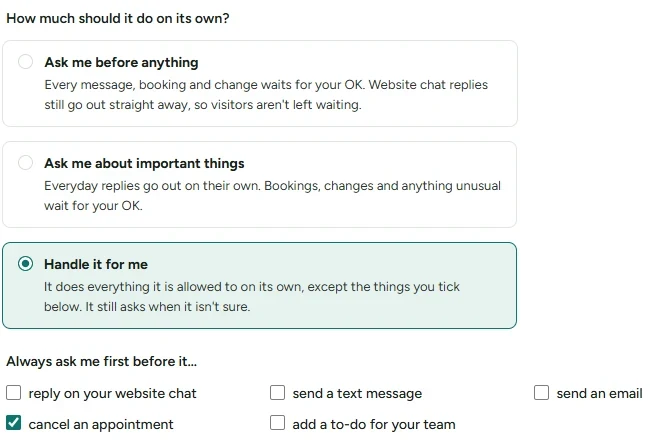
Start with everything checked by a person, then let routine steps run on their own once you trust them.

  • Three levels of independence
  • Always ask for the actions you choose
vbPlatformSettings / Independence
How much should it do on its own: Ask me before anything, Ask me about important things, or Handle it for me. Below, actions to always ask about first, with cancel an appointment ticked.
How much it may do alone. Demo data.

Examples on this page describe what we can set up for you, not a named client project.

One new inquiry, two ways

A customer fills in the website form asking for an appointment.

The form arrives

Today: it sits in a shared inbox. Automated: it is read and the customer's request recognized.

Booking

Today: emails back and forth to find a time. Automated: a time is booked and a confirmation text sent.

Something unusual

Today: it gets missed. Automated: it goes to a named person with the details.

An illustration. Which steps run alone is agreed with you.

How we deliver

One process first, measured, then the next.

  1. 1Map the process

    The steps today and where time goes.

  2. 2Automate the routine

    Predictable steps first; exceptions to people.

  3. 3Test on real cases

    With approval on, before anything runs alone.

  4. 4Go live, then review

    Check results and adjust.

Frequently asked questions

Something else on your mind? Ask us directly.

Does every workflow need AI?

No. Rules-based automation is often the better choice for predictable tasks. AI is used where it helps, such as reading free-text messages.

Do we have to use vbPlatform?

No. We can build workflows inside the software you already run, or connect it to vbPlatform.

What if a workflow makes a mistake?

Steps you mark as important always wait for a person, and every run is logged so you can see what happened.

How much does it cost?

It depends on the processes, the systems involved and ongoing support. You get a written proposal before any commitment.

Tell us what you want to improve

We will help identify a practical next step.

On the call

  1. 1What you want to improve
  2. 2The systems you use today
  3. 3Where AI helps, and where simpler automation fits
  4. 4A focused pilot and how it can grow