1. Home
  2. Products
  3. vbEngage

From inquiry to enrollment.

vbEngage is the admissions CRM in CTeck Connected Campus. Leads arrive from your website, vendors and walk-ins, go to the right rep, and every call, text and email stays on the lead's timeline until they enroll.

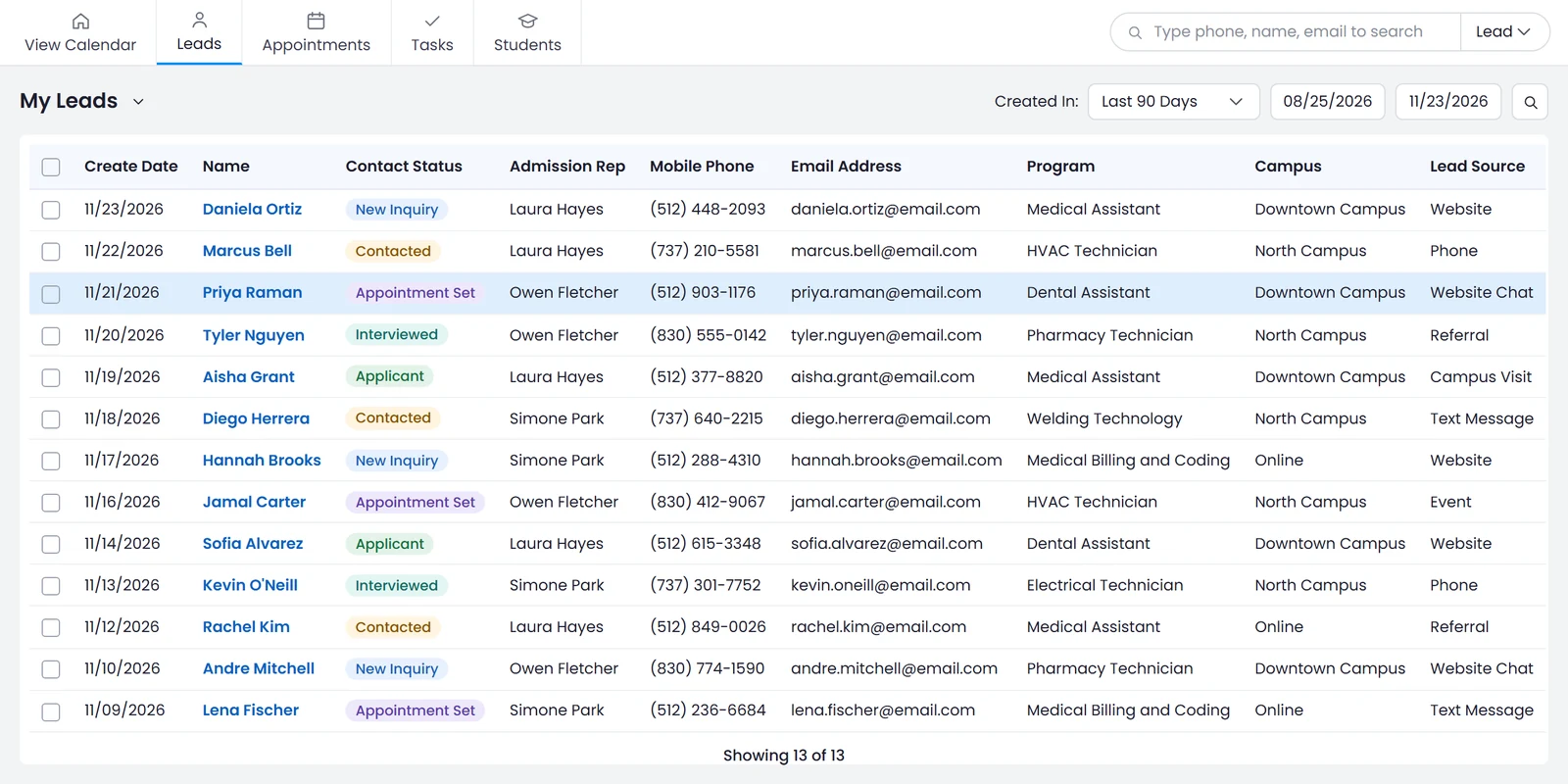
vbEngageLeads
A vbEngage lead list: leads by admissions rep with their status, program, campus, phone, email and lead source.
The lead list for one admissions team. Demo data.

Is vbEngage right for you?

Who it is for

Admissions directors, enrollment leaders and recruiters.

The challenge it addresses

Fragmented prospect information and inconsistent follow-up.

Common uses

Track inquiries, coordinate recruitment outreach and support handoffs to admissions.

What your admissions team works in

Reps see their own leads and what to do next. Directors see the whole team, and where replies are running late.

Leads by rep, stage and source.

For admissions reps

Each lead has a stage, from new lead through applicant to enrolled, an admissions rep and a source, so nothing sits unassigned.

  • Lead list filtered by rep, campus, program and date
  • One timeline with every call, text, email and appointment
  • Tasks and appointments from the lead record
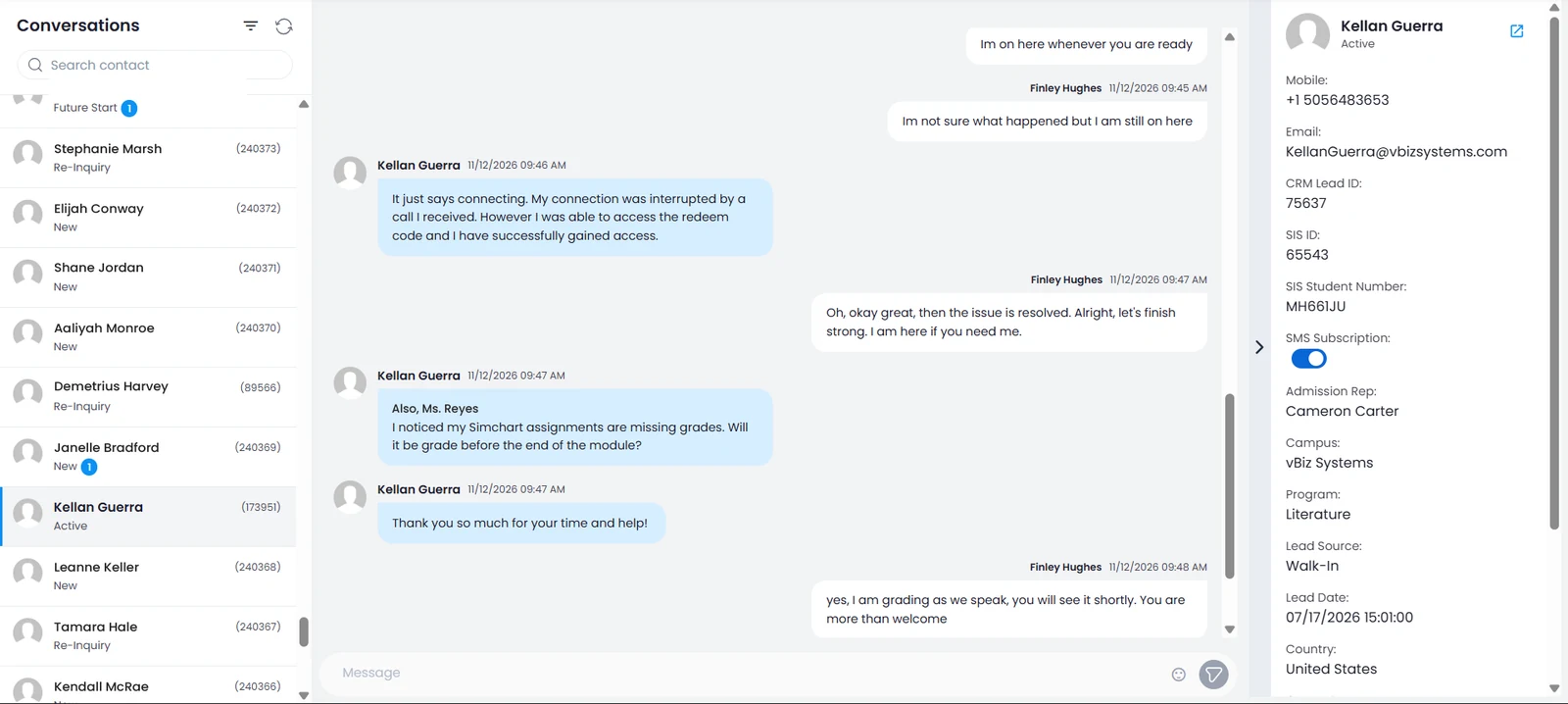
vbEngageLead / Messages
A lead's text conversation in vbEngage, with the lead's details beside it.
A conversation on the lead record. Demo data.

Know which leads are waiting on you.

For admissions directors

Every inbound text and email is tracked until someone replies. Directors see each rep's workload and how long leads wait.

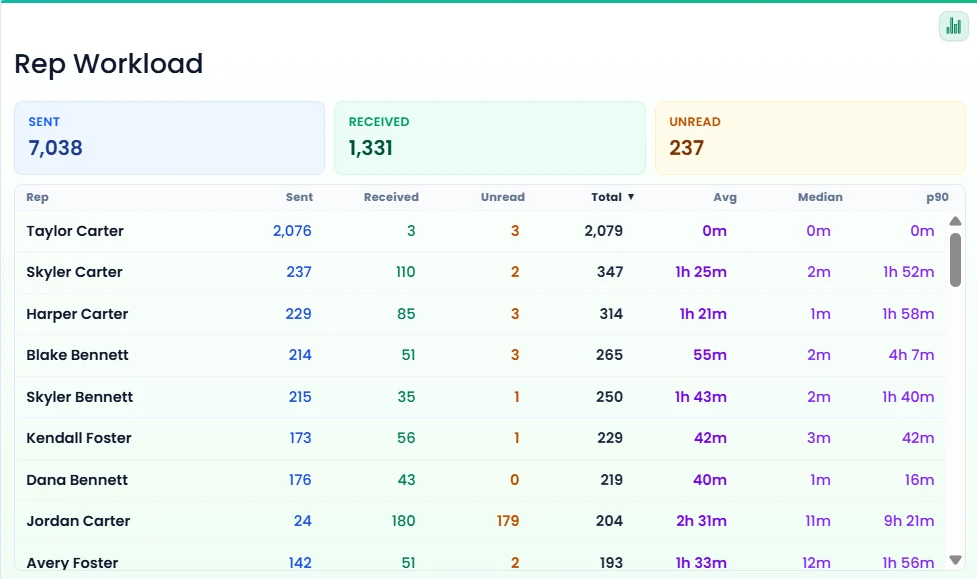
  • Sent, received and unread by rep
  • Response times as average, median and slowest replies
  • Response-time rules with your business hours
vbEngageDashboard / Rep workload
A rep workload table: messages sent, received and unread for each admissions rep, with average, median and slowest response times.
Messages and response times by rep. Demo data.

The texts that need a person, first.

With AI agents

An AI agent reads each inbound text as it arrives, says why it matters, and puts the urgent ones at the top of the list for a rep.

  • Severity and reason written in plain words
  • The source messages one click away
  • Sorted by what is overdue
vbEngageDashboard / Escalations
An escalation feed: a lead who texted from campus asking which building to go to, flagged as high severity because the appointment depends on the answer.
A text flagged for a rep, with the reason. Demo data.

AI agents in vbEngage

They run on OpenAI's models and work from your records. Anything they prepare for a lead waits for a person to approve it, until you decide otherwise.

  • Inbound texts sortedEach reply is read, given a severity and a reason, and the urgent ones go to a rep.
  • Insights for directorsWhere follow-up is slipping and which reps need help, written in plain words.
  • Every step on recordWhat it did, why, and who approved it, kept on the lead's record.

How AI agents work

Integration and implementation

We assess your existing SIS, admissions and messaging connections, data mappings and ownership before launch. Configuration, onboarding, testing and support are agreed up front.

Questions about vbEngage

Something else on your mind? Ask us directly.

Can we keep our existing SIS?

Yes, where a compatible integration is available. We evaluate your interfaces and requirements first.

Can we purchase this independently?

We assess your requirements and any dependencies. Adopting the complete campus suite is not a prerequisite.

How much does it cost?

Pricing depends on your scope and configuration. Get pricing and we will prepare it for you.

See how vbEngage can fit your organization

Request a personalized demonstration, or ask for pricing based on your scope.

On the call

  1. 1How your team works today, and where time goes
  2. 2vbEngage on real screens with demo data
  3. 3What an AI agent would do, and what it asks first
  4. 4The systems you keep, and how we connect them