
Insights from data you already have.
For managers
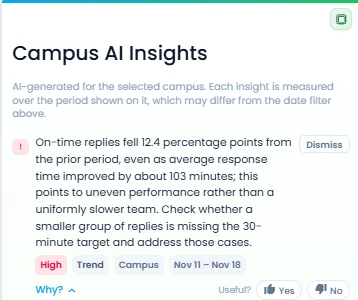
AI reviews existing activity, such as reply times, and explains what changed and where to look, on the dashboard staff already use.
- Read-only access to the data it needs
- No new tool to learn
Your data already lives in a CRM, a student system or an inbox. We add AI where that data is, with clear limits on what it may read and change, instead of moving everything to a new tool.
CTeck Connected Campus ran for years before we added AI to it. Staff kept their screens; AI arrived inside them.
For managers
AI reviews existing activity, such as reply times, and explains what changed and where to look, on the dashboard staff already use.
AI reads records, messages or documents through agreed interfaces, and only the fields it needs.
It proposes a reply, a category or an update; a person approves.
Only for actions you allow, with every change logged in your system.
A sales team wants AI help but cannot leave the CRM they use.
Data copied out, answers pasted back in, and no record of what happened. Integrated: AI works inside the CRM record.
Today: written from scratch. Integrated: a draft appears on the record for the rep to edit and send.
Separate tool: unclear what it saw. Integrated: limited to agreed fields, every call logged.
An illustration. Read and write limits are agreed with you.
Read-only first, then suggestions, then actions you approve.
Systems, interfaces and data owners.
What AI may read and change.
In a non-production environment first.
Failures, usage and accuracy.
Something else on your mind? Ask us directly.
Not necessarily. We assess integration feasibility first.
Only the fields a task needs, under terms agreed with you. We explain what is sent and where before anything goes live.
We look at files, database access or building an API in front of it. See API Development.
Systems with an API, files or database access, such as CRMs, student information systems, inboxes and document stores. We confirm in the inventory step.
Yes. AI features can be paused without affecting the rest of your system, and every action it took stays in the log.
It depends on the systems, the tasks and ongoing AI usage. You get a written proposal before any commitment.
We will help identify a practical next step.