1. Home
  2. Industries
  3. Small & Midsize Businesses

Practical AI for growing businesses

Messages that wait until morning, phone tag over times, no-shows and follow-ups that slip. Fix them one at a time, without adopting a large enterprise system.

What we would set up for you

On vbPlatform, our business CRM with AI agents. Each piece can start on its own.

Bookings and reminders without the phone tag.

For the person who runs the calendar

Customers book into real open times, and reminders go out on their own before every appointment.

  • One calendar for every staff member
  • Reminders by text or email, on a schedule you set
vbPlatformCalendar / Week
The vbPlatform week calendar, booked through the day with appointments for several staff members, alongside follow-up tasks for new inquiries.
A booked week. Demo data.

Every call and text, on the customer's record.

For the owner

Texts, email, website chat, WhatsApp and calls arrive in one inbox, and every conversation the agent handles is saved there.

  • Transcripts of calls the agent handled
  • A person approves anything the agent is unsure about
vbPlatformCustomer / Call
A phone call answered by the Front Desk AI agent, with the full transcript saved on the customer's record.
A call the AI agent answered, with its transcript. Demo data.

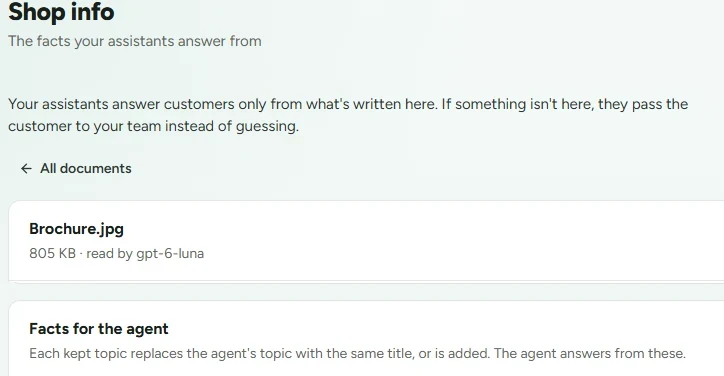
It answers only from what you wrote down.

For whoever worries about wrong answers

You give it your prices, hours and policies. If a question is not covered, it hands the customer to your team instead of guessing.

  • Your facts, reviewed before use
  • Hand-off instead of guessing
vbPlatformAI agent / Knowledge
The knowledge screen: assistants answer customers only from what is written here, and pass the customer to your team instead of guessing. An uploaded brochure has been read and its facts are listed for review.
The facts an agent may use. Demo data.

Examples on this page describe what we can set up for a business like yours, not a named client project.

One evening text, two ways

A customer texts at 7:40 pm asking about price and availability this week.

7:40 pm

Today: the text waits until morning. With an AI agent: a reply in a minute, from your approved prices and hours.

7:42 pm

Today: nothing. With an AI agent: two open times from your real calendar; the customer books Thursday and gets a confirmation.

Next morning

Today: someone replies and the slot has gone. With an AI agent: the booking is made, and anything it was unsure about waits for a person.

An illustration. What an agent may do alone is agreed with you before it goes live.

How a first step looks

Start with the problem that costs you most.

  1. 1A 30-minute call

    Where inquiries come in and what slips.

  2. 2Pick one job

    For example after-hours replies or reminders.

  3. 3Set it up together

    Your hours, prices and calendar go in; your team tests it.

  4. 4Go live, then review

    You see every conversation; we adjust as needed.

Frequently asked questions

Something else on your mind? Ask us directly.

Do we need a large system to get started?

No. Start with one piece, such as website replies or reminders, and add more later.

We already use other software. Does that matter?

Often we can connect your existing tools rather than replace them. We will say plainly when we cannot.

How long does it take to set up?

It depends on how much you start with. We give you a timeline after the first call.

How much does it cost?

It depends on which pieces you use, how many people and channels are involved, and any connections to your software. You get a written proposal before any commitment.

Tell us about your business

We will help identify a practical first step.

On the call

  1. 1How your business runs today
  2. 2Where routine work slows you down
  3. 3Which agents or applications fit
  4. 4A focused first step