
1. Home
  2. Services
  3. Systems Integration

Make your systems share data, without the copy and paste

The same record typed into two systems, nightly exports nobody trusts, and errors found weeks later. We connect the applications you already run so data moves once, correctly, with someone told when it does not.

What we build

A connection that maps each field, moves the data on a schedule or as it changes, and reports anything it could not move.

Every field mapped, and visible.

For IT and operations

You see which system owns each field, how it is transformed on the way, and the status of every connection.

  • Field mapping with transforms and sample values
  • Errors reported and retried, not silently dropped
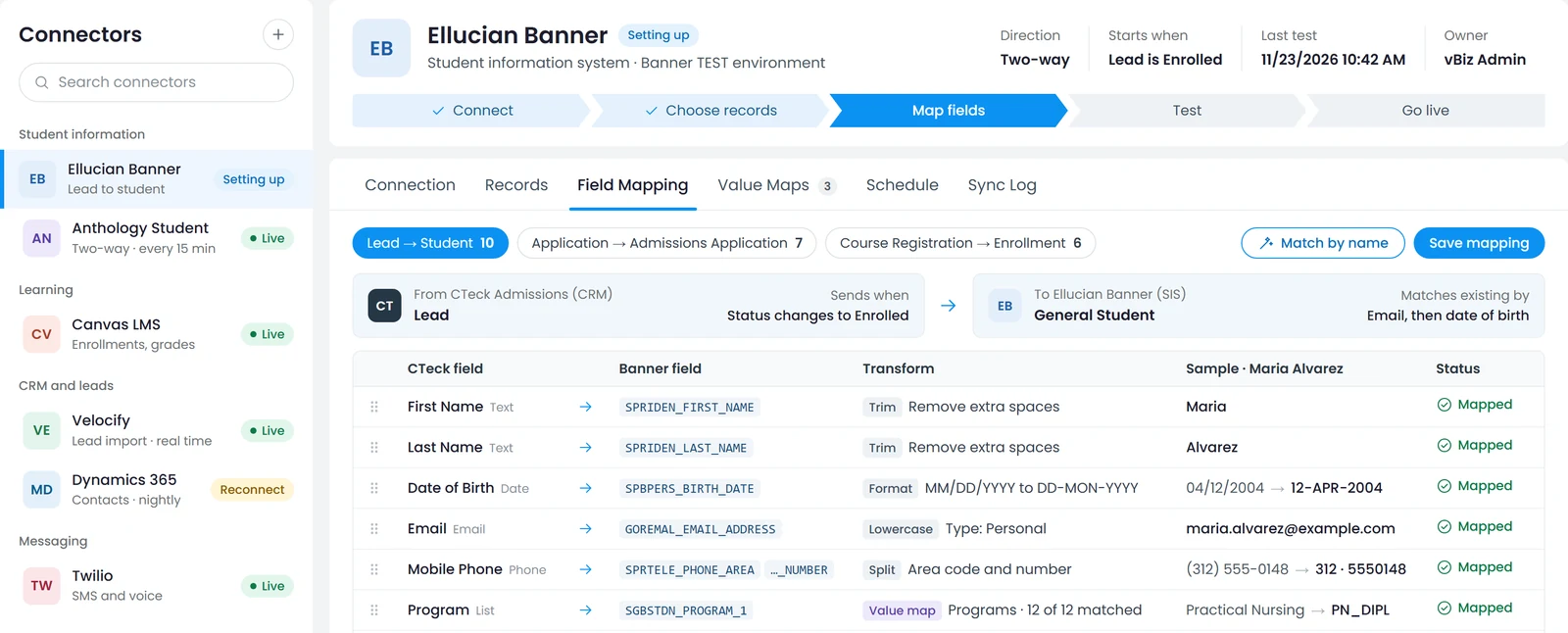
vbIntegrateConnections / Field mapping
An integration setup screen: a list of connected systems with their status, and an admissions lead's fields such as name, date of birth, phone and program mapped to student fields in the SIS, each with its transform and a sample value.
Illustrative screen, sample data.

Systems we have connected

Each came from a client project. Not on the list? We build the connection.

Student information

Ellucian Banner, Anthology CampusVue and CampusNexus, CampusIvy, Edufficient

CRM and leads

Microsoft Dynamics 365, Velocify

Learning and reporting

Canvas LMS, Intelliboard

Financial aid

FAME

Messaging

TrueDialog, Twilio, iContact

One new record, two ways

A prospect becomes a customer in your CRM and needs to exist in your operations system too.

The moment it changes

Today: someone re-types it into the second system when they get to it. Connected: the record is created there within minutes, fields mapped.

When something is wrong

Today: a typo in one system and not the other, found months later. Connected: a missing or invalid field is flagged to a named person the same day.

Month end

Today: two reports that do not agree. Connected: one source for each field, so the numbers match.

An illustration. The systems, direction and timing are agreed per project.

How we deliver a connection

One connection first, proven, then the next.

  1. 1Assess

    Which system owns which data, and what interfaces exist.

  2. 2Map

    Fields, transforms and rules, agreed with your team.

  3. 3Build and test

    Including what happens when a system is down.

  4. 4Run and reconcile

    Monitoring, error reports and checks that both sides match.

Frequently asked questions

Something else on your mind? Ask us directly.

Can you connect third-party software we do not own?

Usually, through its API, files or database, within what the vendor allows. We check interfaces and permissions in the assessment before committing.

What happens when one system is updated?

We monitor the connection and adjust it when a vendor changes its interface. Ongoing support is part of the proposal.

Do we need to replace any software?

No. The point is to keep what you run and make it work together.

How much does it cost?

It depends on the number of systems, the volume and direction of data and the support you want. You get a written proposal after the assessment, before any commitment.

Let us discuss your requirements

We will help identify the right delivery approach.

On the call

  1. 1What you need to build or improve
  2. 2The systems you use today
  3. 3Delivery options that fit your team
  4. 4A practical first step