Connect your applications. Simplify your operations.
Keep your SIS, your lead CRM and your learning platform. We build the connection between them and our software, for your systems and your rules, and our engineers look after it once it's running.
 Screenshot slot
cteck/ct-25-integrations-crop.webp
Is vbIntegrate right for you?
Who it is for
IT leaders and operations teams.
The challenge it addresses
Disconnected applications, duplicate entry and inconsistent data.
Common uses
Connect CRM, admissions, SIS and messaging workflows. Other business applications are scoped individually.
Systems we've connected so far
Each of these came from a client project: a college on one SIS and another CRM, a school sending grades to its learning platform, a team moving years of records. Your system isn't on the list? We build the connection.
- Ellucian BannerStudent information
- AnthologyCampusVue and CampusNexus
- CampusIvyStudent information
- FAMEFinancial aid
- EdufficientStudent information
- Canvas LMSLearning
 CTeck Connected Campus and
vbPlatformBuilt for each client
- VelocifyLead management
- Microsoft Dynamics 365CRM
- IntelliboardReporting
- TrueDialogMessaging
- TwilioCalls and texts
- iContactEmail
The jobs a connection usually does
Most of them move a record from where it starts to where it's needed next, and keep both sides in step.
- Leads become studentsAn applicant in Velocify or Dynamics lands in the SIS when they enroll, and the SIS sends the student's status back so the CRM stays current.
- Grades and attendanceClass results and attendance go from the SIS to Canvas, or the other way, on a schedule you choose.
- Financial aidAid and disbursement records move between FAME, CampusIvy and the student's account.
- Student importsNew students and their documents brought in from another system, checked before they're saved.
- MessagingTexts and calls through TrueDialog or Twilio, email through iContact, logged on the contact's record.
- ReportingData sent to a warehouse or to Intelliboard, so your reports see every system at once.
How we build one
You don't need developers on your side. Our engineers do the work, and you sign off on each step.
Map your systems
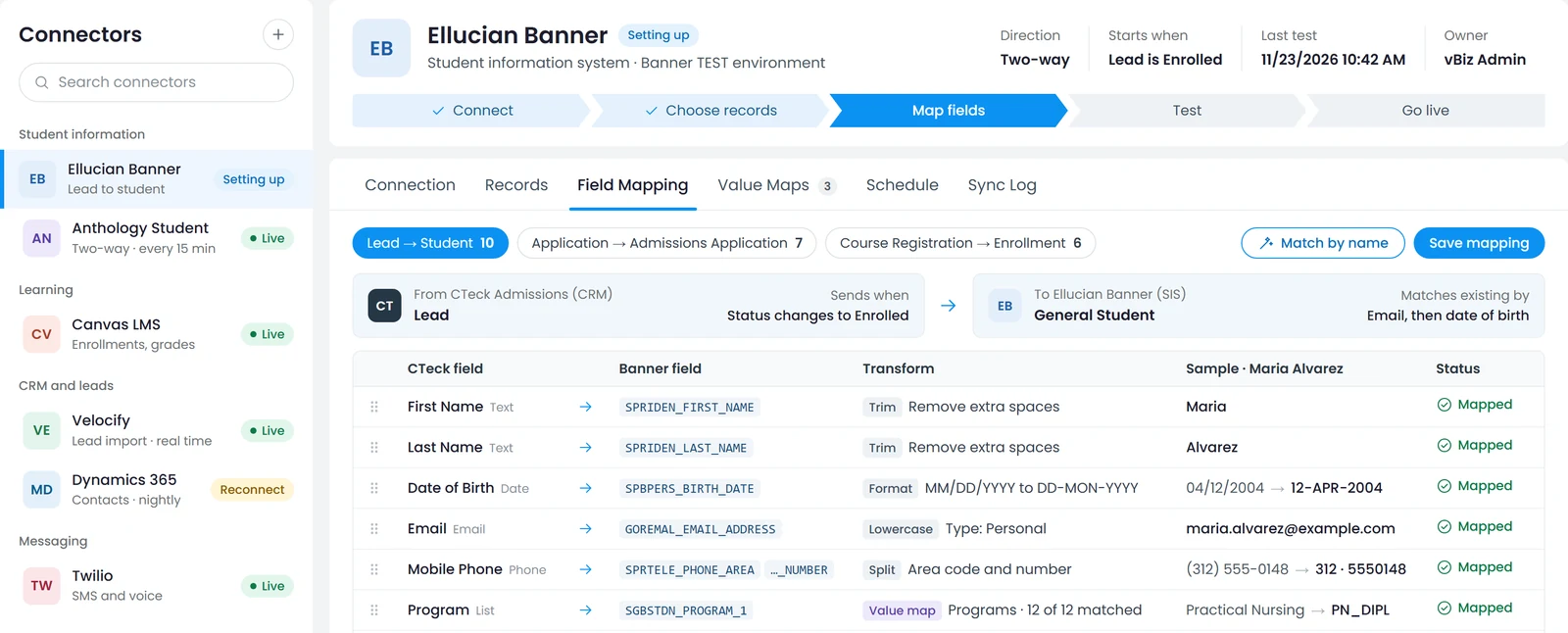
Which system owns which record, what moves, which way and how often.
Match the fields
Your fields and codes matched to ours, with a sample of real records checked together.
Run it side by side
The connection runs while your team keeps working as usual, until the results match.
We look after it
When one of your systems changes, we change the connection with it.
Moving from another system
Switching to CTeck Connected Campus or vbPlatform doesn't mean starting over. We bring your records across and check them with you before anything goes live.
- Students, leads and contacts with their history
- Programs, courses and terms matched to how you run them
- Duplicates and gaps found and settled with you first
- One kind of record at a time, each signed off by your team
Questions IT teams ask us
Something else on your mind? Ask us directly.
Our system isn't on your list. Can you connect it?
Most likely. If it has an API, a database we're allowed to read, or a file export, we can build the connection. Tell us what it is and we'll say plainly what's possible.
Do we need our own developers?
No. Our engineers build, test and look after the connection. Your team helps us decide what moves where and checks the results.
Does data go both ways?
It can. A common setup sends new students from the CRM into the SIS and sends their status back to the CRM. We agree which system owns each record so they never overwrite each other.
Does it work with vbPlatform too, or only CTeck Connected Campus?
Both. The same team builds connections for CTeck Connected Campus and for vbPlatform.
What happens when our SIS has an update?
We keep the connection working. When either side changes, we update it and check it again with you.
Do we need to replace our existing software?
Not necessarily. We assess the available interfaces and recommend an integration approach that preserves the systems that work for you.
Can we purchase this independently?
We assess your requirements and any dependencies. Adopting the complete campus suite is not a prerequisite.
How much does it cost?
Pricing depends on your scope and configuration. Get pricing and we will prepare it for you.
Related offerings
Each application can be adopted on its own and connected as you grow.