1. Home
  2. Industries
  3. Construction

Simpler field and office workflows

Receipts in the truck, costs typed up on Friday, and no clear answer to "is this job making money?" Capture costs where they happen and let the office read them the same day.

What we would set up for your crews

Usually Talk2Log, our job-cost app for the web and Android. Other pieces can be added later.

Log a cost in one sentence.

For crews on site

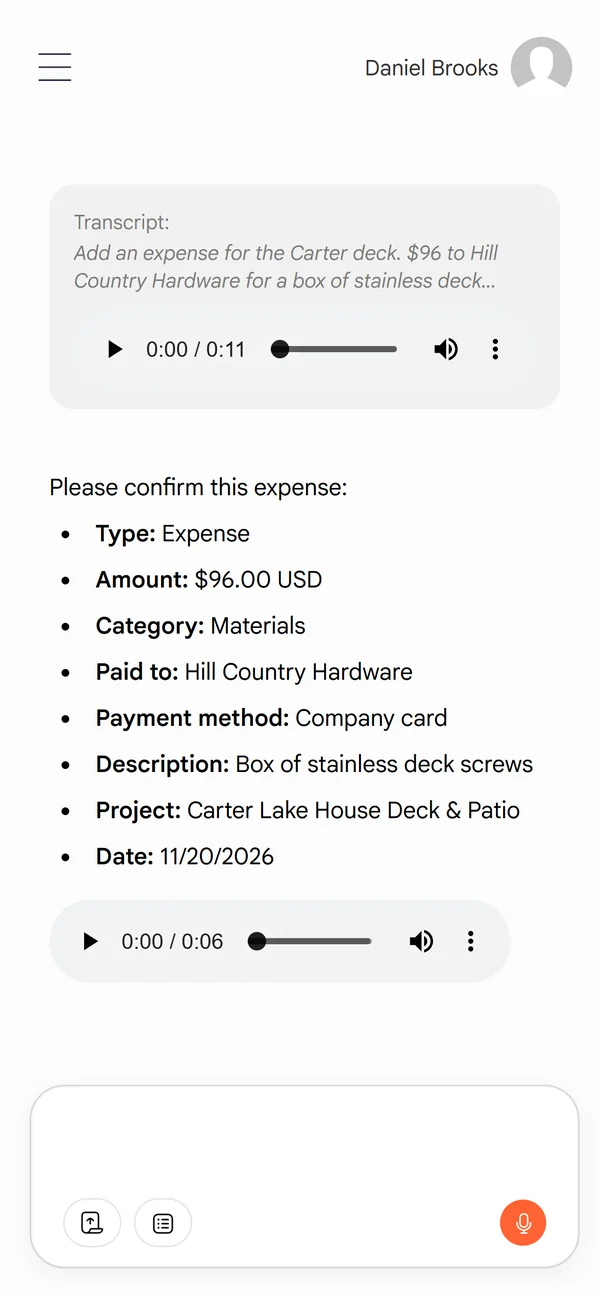
Say what you spent, or photograph the receipt. Talk2Log reads it back as an entry on the right job, and nothing is saved until you confirm.

  • Voice or receipt photo, on the phone
  • You confirm before anything is saved
A voice note's transcript in Talk2Log on a phone, followed by the expense it understood: $96.00 for materials, paid to Hill Country Hardware by company card, for the Carter Lake House Deck and Patio, waiting for confirmation.
A voice note, read back for confirmation. Demo data.

Know whether a job is making money.

For owners and project managers

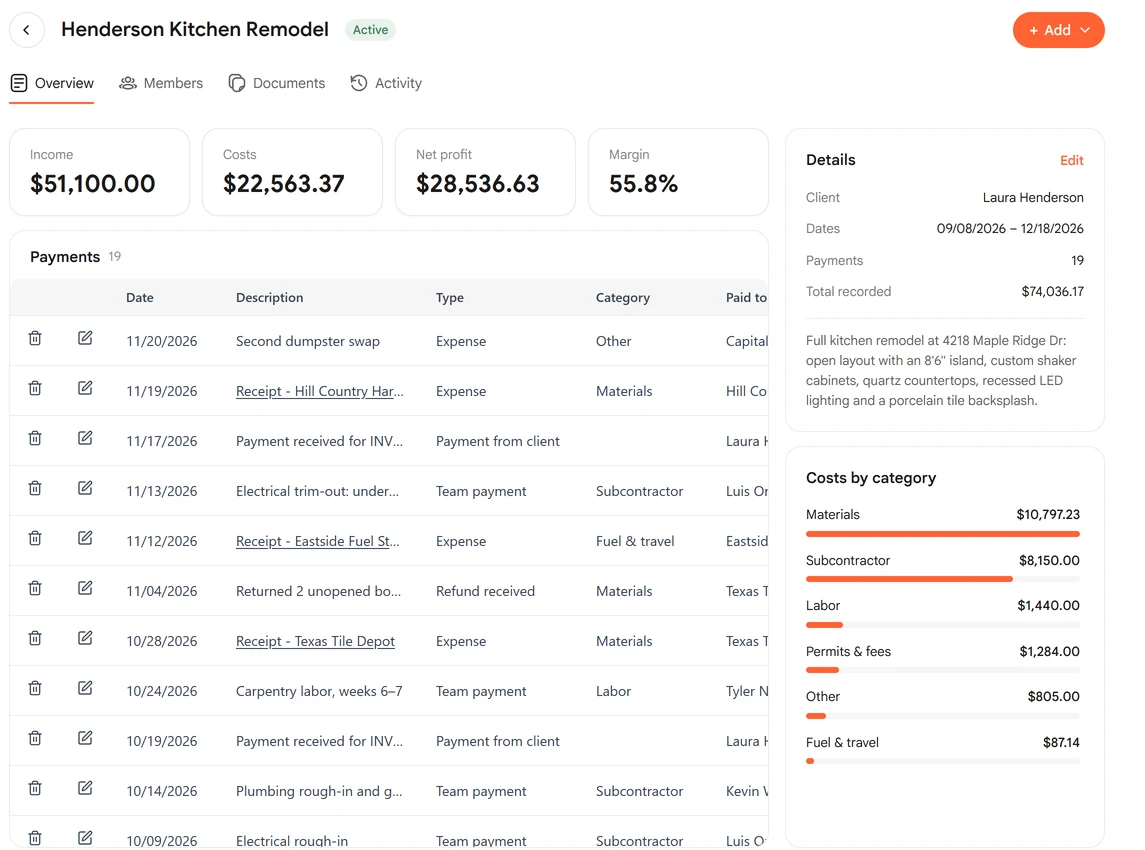
Each project shows income, costs, profit and margin as entries come in, with costs broken down by category.

  • Live margin per project
  • Ask in plain words, such as "which bills are due?"
Talk2LogProject / Overview
A Talk2Log project overview for a kitchen remodel: income, costs, net profit and margin tiles, the list of the project's payments, the project details and a costs-by-category breakdown with bars.
One project's numbers. Demo data.

Permits, drawings and invoices in one place.

For the office

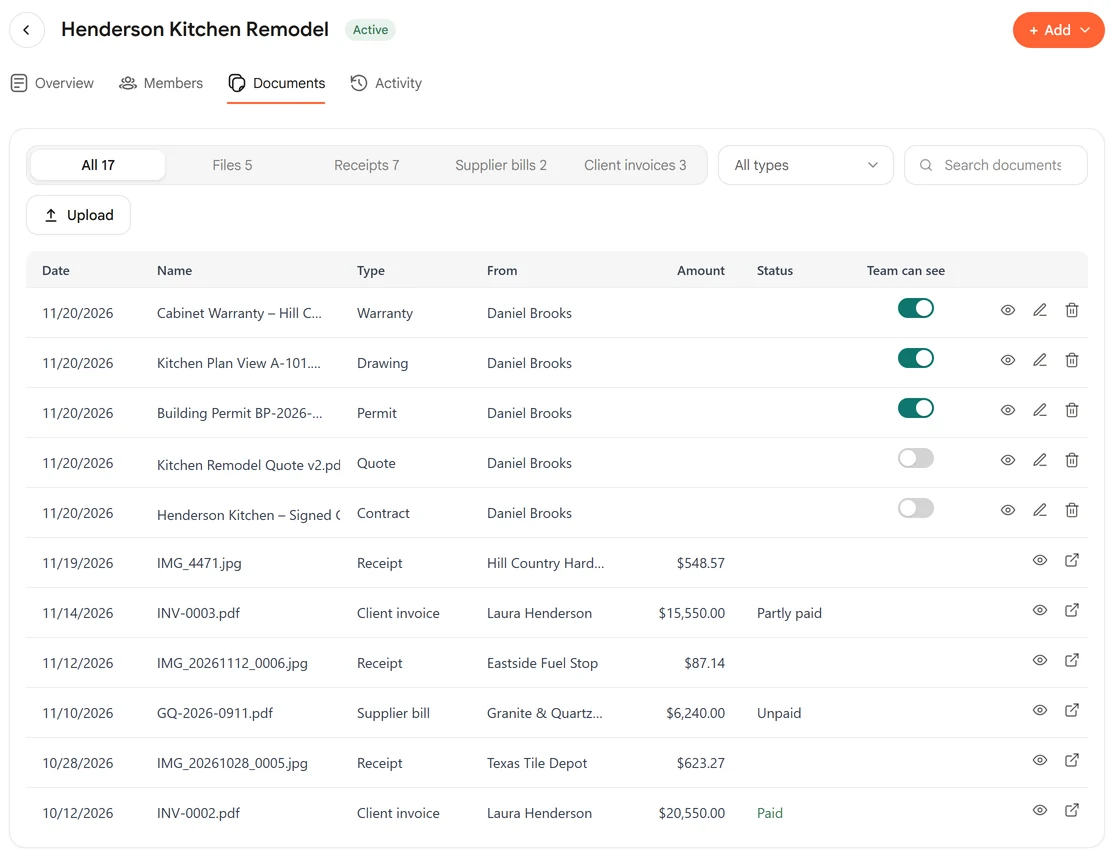
Each project keeps its documents next to its costs, and you choose which ones the crew can see.

  • Contracts, permits, drawings and warranties
  • Client and supplier invoices with their status
Talk2LogProject / Documents
A project's documents in Talk2Log: a warranty, a drawing, a permit, a quote and a contract with a Team can see switch on each, followed by receipts and client and supplier invoices with amounts and status.
A project's documents. Demo data.

Examples on this page describe what we can set up for a contractor like you, not a named client project.

One hardware run, two ways

A crew lead buys $96 of materials for a deck job on Tuesday afternoon.

Tuesday, 2:10 pm

Today: the receipt goes in the truck's door pocket. With Talk2Log: one sentence into the phone; it is read back, confirmed and on the deck job.

Friday

Today: someone types up a week of faded receipts. With Talk2Log: nothing to type; the office already sees it.

End of the job

Today: the margin is a guess until the books are done. With Talk2Log: the margin has been visible all along.

An illustration with sample figures.

How a first step looks

Start with the problem that costs you most.

  1. 1A 30-minute call

    How costs and paperwork move today.

  2. 2Pick one job site

    Try it on one live project first.

  3. 3Set it up together

    Projects, categories and your crew go in.

  4. 4Go live, then review

    Check the entries with your office; we adjust as needed.

Frequently asked questions

Something else on your mind? Ask us directly.

Do field crews need training?

Very little. If they can send a voice note or take a photo, they can log a cost. We walk the first crew through it on site or on a call.

What if it reads a receipt wrong?

Nothing is saved until the person confirms it, and any field can be changed first.

Does it replace our accounting software?

No. It keeps job costs, payments, receipts and bills per project. Tell us what your bookkeeper uses and we will discuss connecting it.

How much does it cost?

It depends on the number of users and projects and any connections you need. You get a written proposal before any commitment.

Tell us about your business

We will help identify a practical first step.

On the call

  1. 1How your business runs today
  2. 2Where routine work slows you down
  3. 3Which agents or applications fit
  4. 4A focused first step