1. Home
  2. Products
  3. vbConnect

Connect. Communicate. Engage.

Bring business and student messaging into a focused platform. Keep conversations moving and coordinate timely updates without relying on disconnected communication processes. Staff text, email and call from the record, and every reply comes back to the right person. Use it on its own, or as part of CTeck Connected Campus, where the screens below come from.

vbConnectConnect / Messages
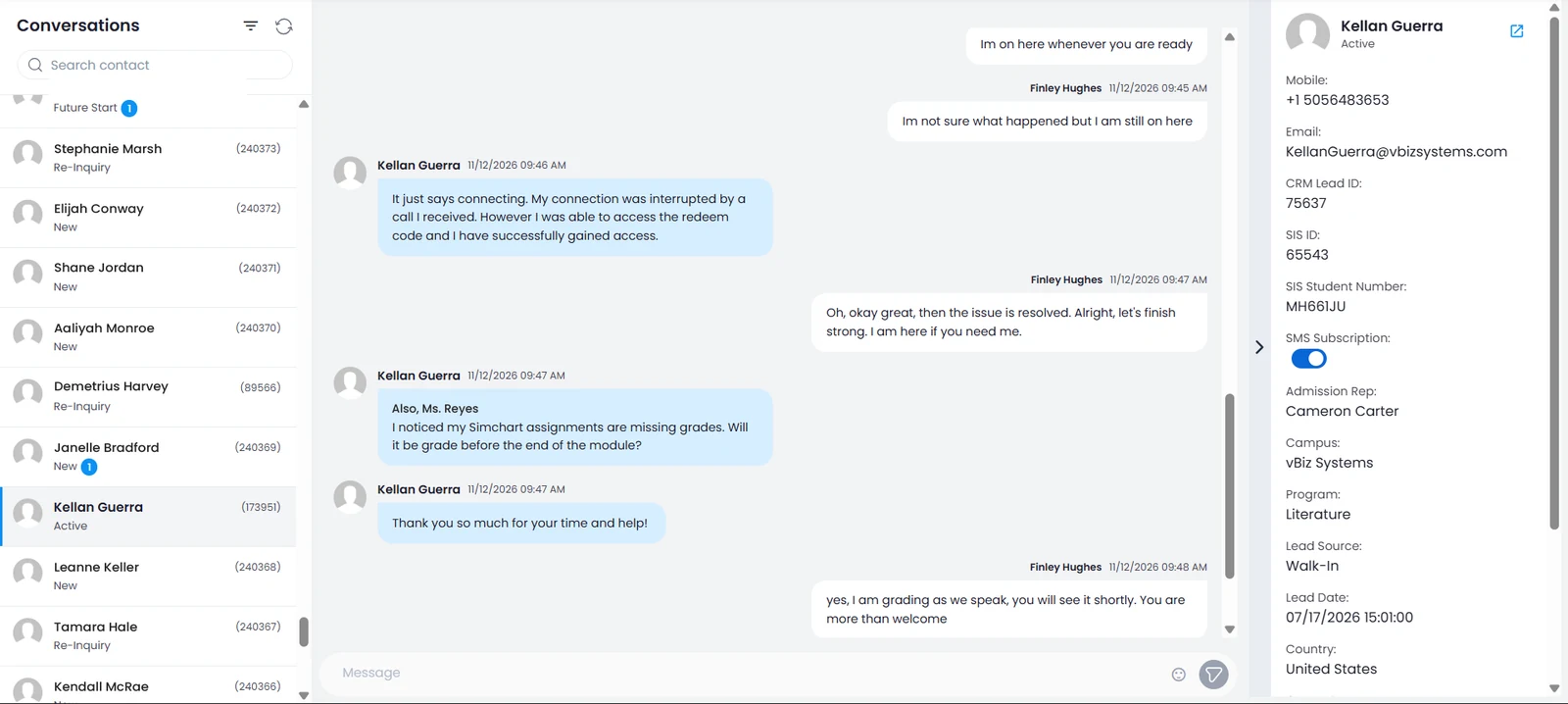
A vbConnect two-way text conversation with a lead, alongside the lead's details.
A text conversation with a lead. Demo data.

Is vbConnect right for you?

Who it is for

Teams managing customer or student communication.

The challenge it addresses

Scattered conversations, manual reminders and inconsistent follow-up.

Common uses

Coordinate appointment reminders, respond to inquiries and support admissions follow-up.

Every channel, from one record

Texting runs through TrueDialog or Twilio. Opt-outs, do-not-contact and quiet hours are checked before anything is sent.

Two-way texting, threaded and logged.

For staff who answer customers and students

Students and leads reply to a text like they would to anyone. The conversation stays on their record, so the next person who picks it up sees the whole thread.

  • Two-way texting through TrueDialog or Twilio
  • Click-to-call with each call logged
  • Email campaigns and announcements by program, campus, status or term
vbConnectDashboard / Escalations
An escalation feed: a lead who texted from campus asking which building to go to, flagged for a rep with the reason and the source message.
An inbound text, flagged for the rep who owns the lead. Demo data.

See how fast your team replies.

For directors

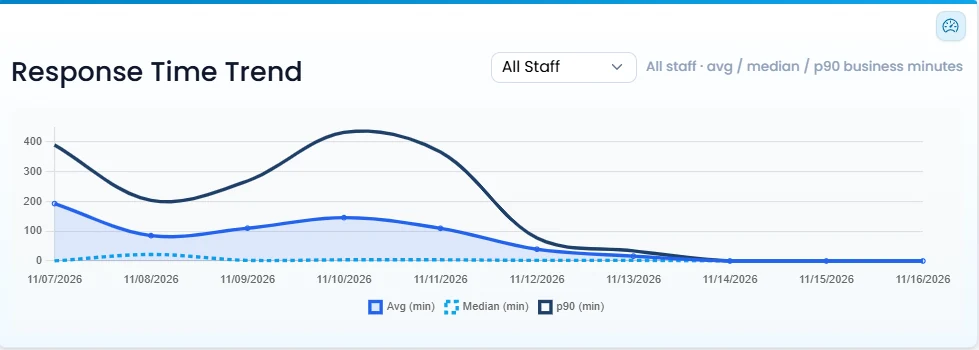
Response times are measured in business minutes for every rep and every conversation, so you can see when replies slow down and who needs help.

  • Average, median and slowest replies by day
  • By rep or all staff
  • Your business hours and holidays respected
vbConnectDashboard / Response time trend
A response time trend chart: average, median and slowest reply times in business minutes over ten days, for all staff.
Reply times over ten days, for all staff. Demo data.

AI agents in vbConnect

They run on OpenAI's models and work from your records and policies. Anything they send a student or lead waits for a person to approve it, until you decide otherwise.

  • Inbound texts sortedEach reply is read and the urgent ones are flagged for a rep, with the reason.
  • Replies draftedAnswers to common questions prepared from your records, for staff to approve.
  • Opt-outs caughtLoose opt-out wording like "stop texting me" is recognised and no reply goes out.

How AI agents work

Integration and implementation

We review your SIS, CRM and SMS provider connections, along with message consent and opt-out handling, before launch. Configuration, onboarding, testing and support are agreed up front.

Questions about vbConnect

Something else on your mind? Ask us directly.

Can we use our existing messaging provider?

We review provider compatibility, configuration and messaging requirements before deployment.

Can we purchase this independently?

We assess your requirements and any dependencies. Adopting the complete campus suite is not a prerequisite.

How much does it cost?

Pricing depends on your scope and configuration. Get pricing and we will prepare it for you.

See how vbConnect can fit your organization

Request a personalized demonstration, or ask for pricing based on your scope.

On the call

  1. 1How your team works today, and where time goes
  2. 2vbConnect on real screens with demo data
  3. 3What an AI agent would do, and what it asks first
  4. 4The systems you keep, and how we connect them