
- Home
- VbConnect
The CRM with digital employees on the team.
VbConnect keeps your contacts, conversations, appointments and payments in one place. Digital employees work inside it, answering, booking, reminding and following up, and your team approves what matters.
- CRM, inbox, calendar and payments
- Digital employees, with your approval
- Templates for any business's daily work
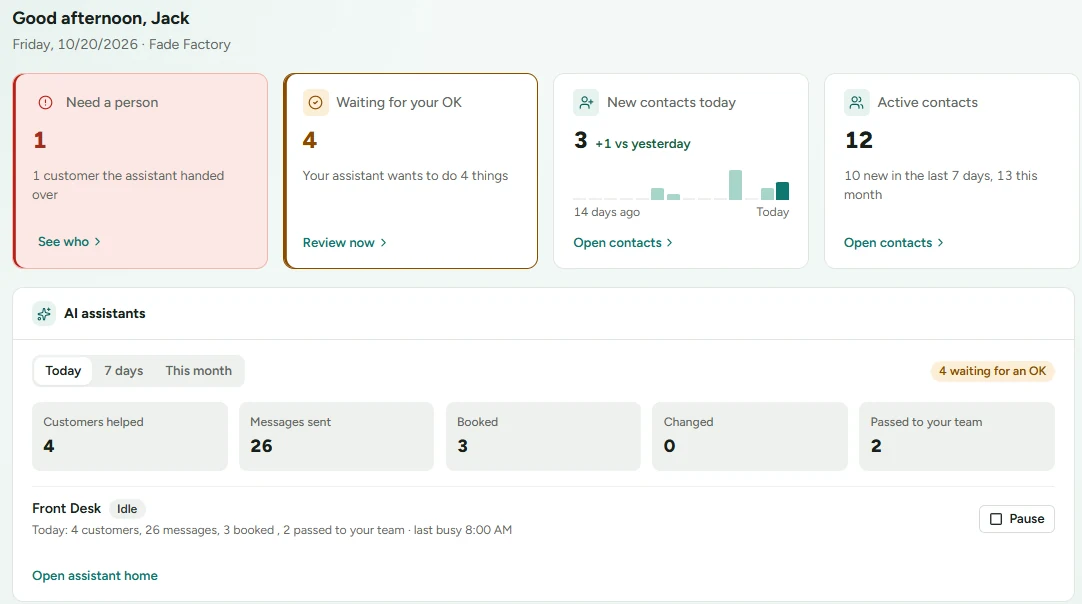 Screenshot slot
vbiz-connect/vc-15-dashboard.png
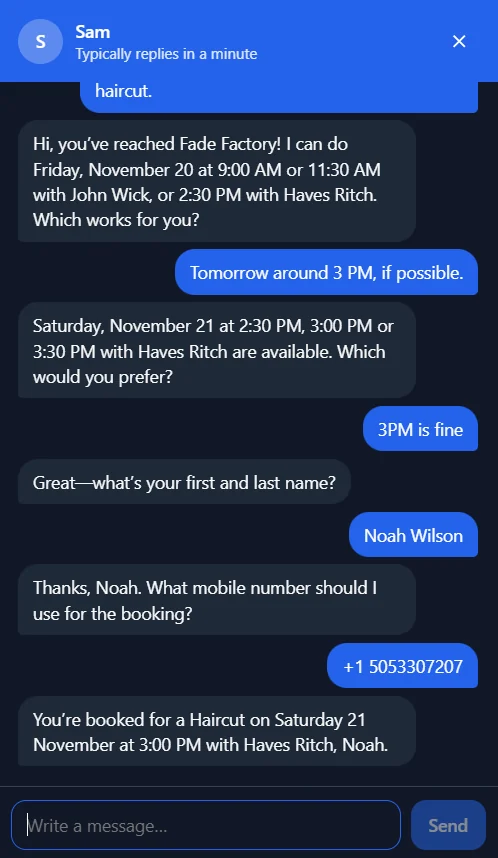 Screenshot slot
vbiz-connect/vc-17-chat-mobile.png
A digital employee is a job description, not a chat window.
Most CRMs record the work your team did. VbConnect also does some of it, inside the same records your staff use, with the same rules a good manager would set.
- A roleFront Desk, Reminders, Reviews or one you design, each with its own instructions.
- Your knowledgeYour price list, hours and policies. It answers from these and nothing else.
- Actions it may takeReply, book, move, remind, add a to-do for your team. You choose which.
- Working hoursWhen it may contact customers, in each customer's own time zone.
- A person it reports toAnything it isn't sure about waits for your OK or goes to your team with a note.
- A record of every stepWhat it did, why it did it and who approved it, on the customer's record.
Hiring one takes four steps.
You set it up the way you'd onboard a new staff member. It starts paused and then in approval mode, so nothing reaches a customer until you're ready.
-
Pick a role
Start from a template for the work your business does every day. Each one arrives with safe default rules and knowledge documents for you to fill in.
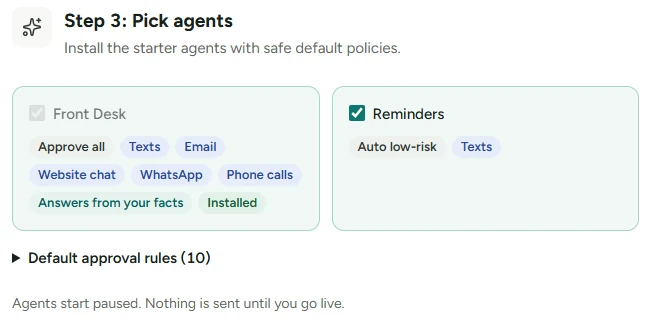 Screenshot slot
vbiz-connect/vc-11-onboarding.pngNew digital employees start paused. -
Give it your facts
Upload a brochure or price list, or type your hours and policies. It reads the file, suggests topics for you to review, and answers only from what you keep.
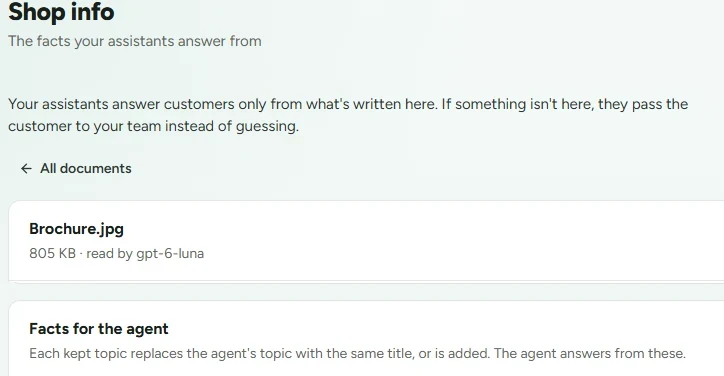 Screenshot slot
vbiz-connect/vc-10-knowledge.pngIf the answer isn't in your facts, it hands over instead of guessing. -
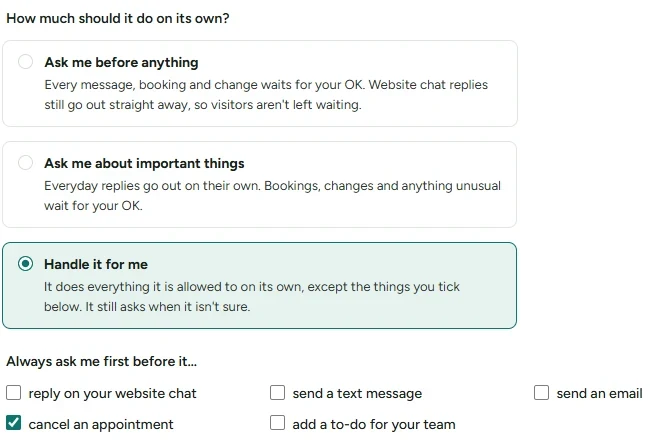
Decide what it does alone
Choose how much it handles on its own, from asking before anything to taking care of routine work. Then tick the actions that should always wait for you.
 Screenshot slot
vbiz-connect/vc-09-autonomy.pngThree levels in plain words, plus the actions that always need your OK. -
Approve its work, then let go at your pace
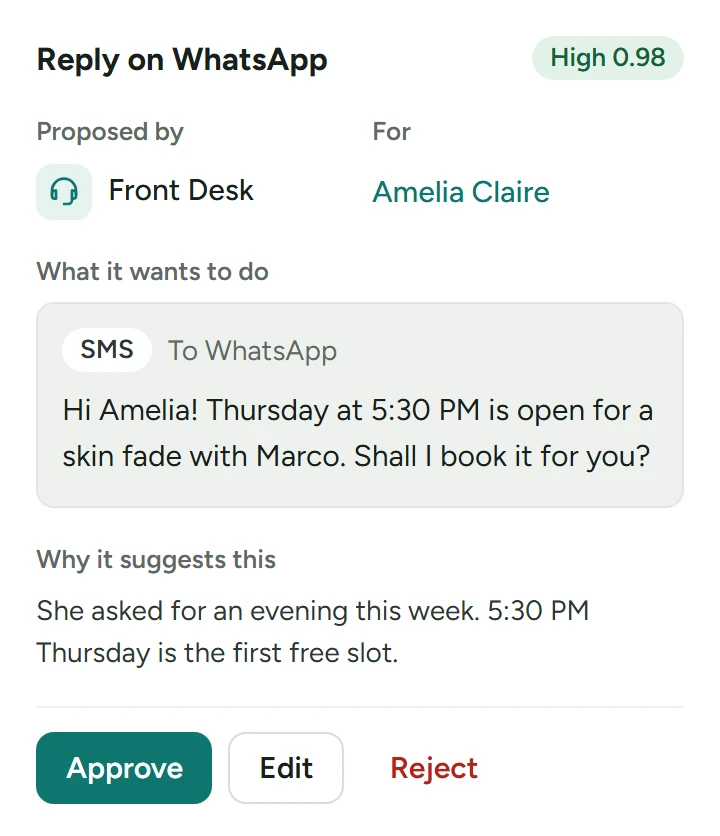
Its proposals wait in one queue, each with the message it wants to send and why. Approve, edit or reject. Loosen the rules one action at a time as it earns your trust.
 Screenshot slot
vbiz-connect/vc-02-approvals.pngOne proposal from the approvals queue. It says why, before you say yes.
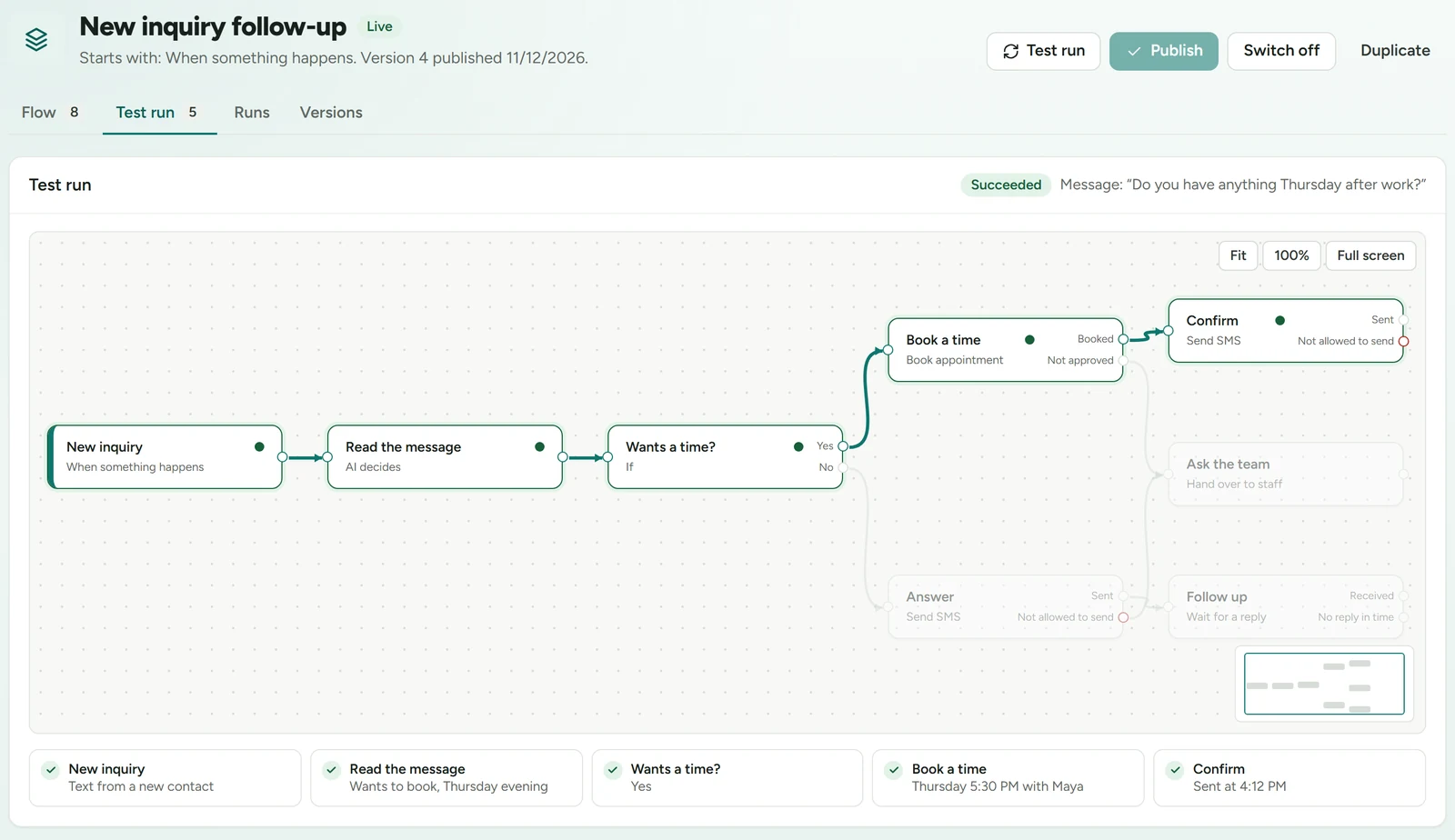
Every workflow is a picture you can read.
Lay out the steps a digital employee follows: what starts it, what it decides, what it may do and where it hands over to your team. Test it on a sample message first, then replay any real run step by step.
 Screenshot slot
vbiz-connect/vc-07-workflow-canvas.png
Roles to staff now, and the ones you design.
Every role runs on the same engine. A new role is a new set of instructions, knowledge, allowed actions and working hours.
Front Desk
Answers texts, website chat, WhatsApp, email and phone calls from your own price list and policies, and books in the same conversation.
Hands to you: upset customers and anything it can't answer.
Appointment Coordinator
Books, moves and cancels against live availability with the right staff member, for family members too, and confirms by text or email.
Asks you first: cancellations, unless you allow them.
Reminders and follow-up
Confirms each booking, reminds the customer ahead of time and follows up after a no-show, inside quiet hours.
Hands to you: any reply that isn't a yes or a reschedule.
Reviews
Asks for a rating after each visit and sends your review link only to customers who were happy.
Hands to you: every low rating, before anything else is sent.
Admissions Rep
For schools: replies to new inquiries, answers program, start-date and cost questions from your catalog, books visits and chases missing documents.
Hands to you: financial aid and transfer-credit questions.
A role you design
Your instructions, your knowledge, the actions you allow and the hours you set, tested on scripted conversations before it meets a customer.
You decide: what runs alone and what always waits.
Everything the front office runs on.
Your team works in the same records the digital employees do, so nobody re-types anything and every conversation has its history.
Appointments on one shared calendar.
Every booking, by staff member, whether your team made it or a digital employee did, alongside follow-up tasks for new inquiries.
- Live availability, no double-booking
- Bookings for family members
- Confirmations by text or email
 Screenshot slot
vbiz-connect/vc-16-calendar-week.png
Texts, email, WhatsApp and calls on one record.
Every conversation lands on the customer's record, whoever answered it. Calls a digital employee picks up keep their full transcript.
- One inbox for every channel
- Take over a conversation any time
- Quiet hours shown per customer
 Screenshot slot
vbiz-connect/vc-14-lead-call.png
A chat on your website that can actually book.
Visitors ask about services, prices and times. The Front Desk answers from your facts and books the appointment in the same conversation.
- Live availability
- Several bookings in one chat
- Hands over with a note
Screenshot slotvbiz-connect/vc-17-chat-mobile.png
Contacts and families
Every visit, message, payment and form on one record, with family members linked.
Memberships
Online sign-up forms with e-signature and payment, ready for clubs, studios and centers.
Hall and banquet bookings
Requests, agreements and totals for venues and community halls.
Student records for small schools
Classes, attendance, grades, fees and a parent portal. See the school module
Guard rails nobody has to remember.
The software checks them before anything goes out. They are not left to the AI's judgment.
- Consent firstOpt-ins, do-not-contact lists and STOP replies are checked before every message.
- Quiet hoursTexts go out only between 8am and 9pm in the customer's own time zone.
- Facts from your recordsPrices, times and links come from your data. If it can't find them, it doesn't guess.
- It knows when to step backAn upset customer, a question it can't answer, or a request for a person: it hands over with a note.
- A budget it can't exceedSet a monthly AI spend. It stops at the limit instead of surprising you.
- It says what it isAsked sincerely, it tells the customer it's a virtual assistant.
Questions owners ask us.
Something else on your mind? Ask us directly.
Do we have to use the digital employees?
No. VbConnect is a complete CRM on its own: contacts, inbox, calendar, memberships and bookings. Add a digital employee when you're ready, one role at a time.
Will it send anything without our OK?
Not until you decide it may. A new digital employee starts paused, then works in approval mode, where every message and booking waits for a person. You loosen that one action at a time.
What does it answer from?
Only from the facts you give it and your own records: services, prices, hours, policies and the customer's history. When the answer isn't there, it passes the conversation to your team with a note instead of guessing.
Which AI does it use?
Our digital employees run on OpenAI's models. What we build is everything around them: the CRM, the rules they follow, the approvals and the record of every step. You set a monthly AI budget, and it stops at the limit.
Does it pretend to be a person?
No. If a customer sincerely asks, it says it's a virtual assistant, and it offers to pass them to someone on your team.
Can it answer the phone?
Yes. The Front Desk can pick up calls, answer from your facts, take messages and book appointments. The full transcript is saved on the customer's record.
What kinds of businesses is it for?
Businesses that run on appointments, inquiries and follow-up: clinics, studios, salons, fitness and learning centers, community organizations and small schools. Role templates cover the everyday work, and we can design a role for yours.
How do we get started?
We learn how your front office works, bring over your contacts and connect your channels, then switch on one digital employee in approval mode while your team watches it work. How we set you up